


View, Save and Print PDFs
Comodo Dragon allows you to quickly view, save, print search within PDFs.
To open a PDF in Dragon
- Open Comodo Dragon
- Press Ctrl+O, navigate to the location where the PDF file is saved and click 'Open'
To save a PDF
Use any of the following methods:
- Right-click the PDF and select 'Save as'.
- Use
the keyboard shortcut Ctrl+S.
- Click the menu
 button at the top-right and select 'Save page as'.
To print a PDF
Use
any of the following methods:
- Right-click the PDF and select Print.
- Use the keyboard shortcut Ctrl+P.
- Click the menu button at the top-right and select 'Print'.
To search in a PDF
- Press the keyboard shortcut Ctrl+F to search the text in your PDF.
- The search window at the right hand side will appear.
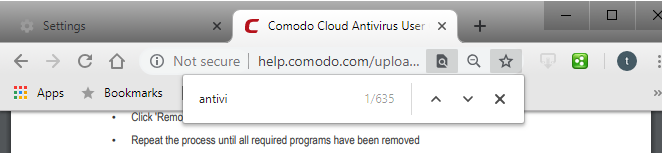
- Enter the text in the search box.
- The number of matching items will be displayed on the right.
- You can search up or down the PDF
file by clicking the
 buttons.
- To
close the search box, click the
 button.