


Choose Aggregation Fields and Result Columns
- Click 'Security' > 'Endpoint Security' > 'EXDR' > 'Event Search' to reach the controls described here.
Event Search has two field pickers, and they do different jobs. 'Select fields to show aggregations' decides which summary cards appear above the result table; 'Select Fields' decides which columns the result table itself shows. Both are check-box lists over the same event schema.
You can add and remove aggregation cards, add and remove result columns, and save either choice so it is used on your next search.
Aggregation cards
An aggregation card groups the events your query returned by one field and counts each distinct value. Each card shows the field name as its heading, prev and next arrows to page through the values, and one row per value with a count badge at the right.
- Run a query so there are results to summarise.
- Click 'Select fields to show aggregations' under the query box.
- Tick the fields you want a card for.
- Click 'Save'.
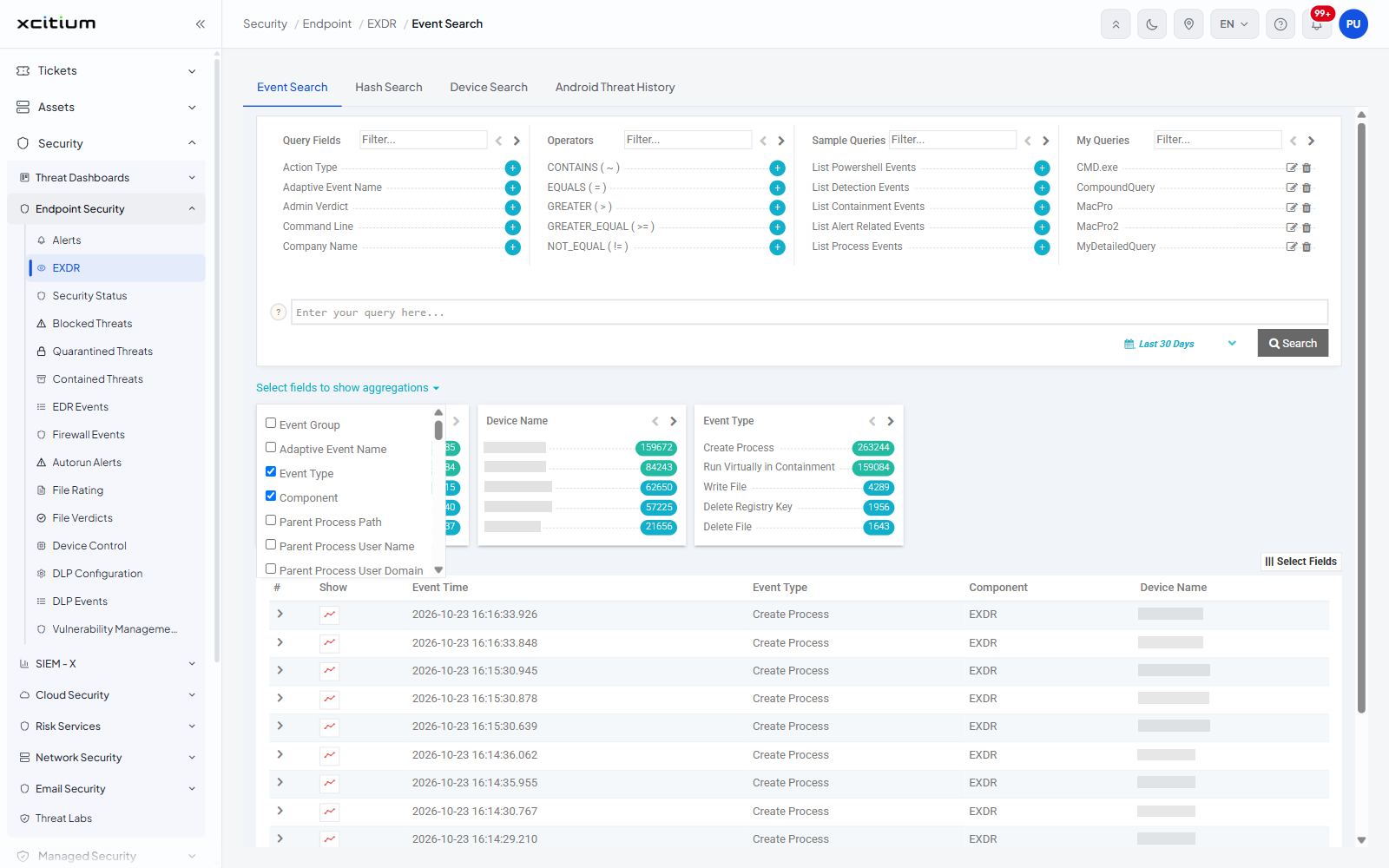
The list offers 49 fields:
| Group | Fields |
| The event itself | 'Event Group', 'Adaptive Event Name', 'Event Type', 'Component', 'Action Type', 'Duplicate Count' |
| The parent process | 'Parent Process Path', 'Parent Process User Name', 'Parent Process User Domain', 'Parent Process Hash', 'Parent Process FLS Verdict' |
| The process | 'Path', 'Elevation Type', 'Command Line', 'Hash', 'FLS Verdict', 'Process User Name', 'Process User Domain' |
| The device and user | 'Device Name', 'Device OS', 'Logged On User' |
| Network | 'Source IP', 'Destination IP', 'Source Port', 'Destination Port', 'Network Transfer Protocol', 'URL' |
| Registry | 'Registry Value Name', 'Registry Key Path', 'Registry Value Data' |
| Files | 'File Path', 'File Old Path', 'File Hash', 'File Name', 'File Description', 'File Extension', 'File Version', 'Downloaded File Path', 'Downloaded File Hash' |
| File metadata | 'Copyright', 'Signature', 'Company Name', 'Product Name', 'Product Version', 'Original Name' |
| Verdicts | 'Xcitium Verdict', 'Admin Verdict' |
| Containment | 'Contained By', 'Containment Policy' |
Result columns
'Select Fields' sits at the right, just above the result table. Clicking it opens a scrollable check-box list of every column the table can show.
- Click 'Select Fields' above the result table.
- Tick the columns you want and clear the ones you do not.
- Click 'Save'.
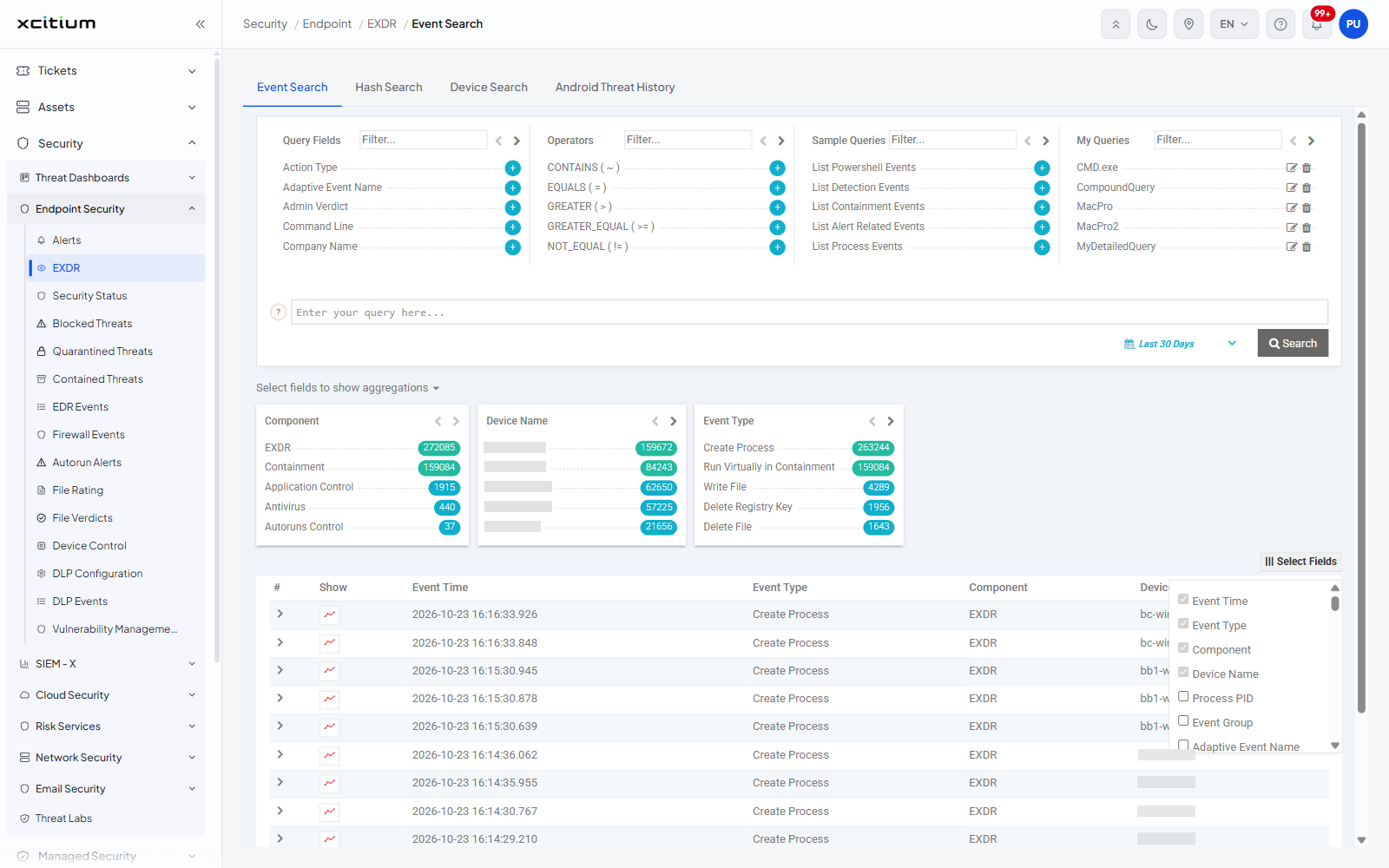
The list offers 63 columns. Four are ticked when the screen opens - 'Event Time', 'Event Type', 'Component' and 'Device Name' - and they are the four columns the result table starts with.
| Column | Description |
| Event Time | When the event happened. Shown by default. |
| Event Type | The kind of event, for example 'Create Process'. Shown by default. |
| Component | Which part of the client reported it, for example 'EXDR'. Shown by default. |
| Device Name | The device the event came from. Shown by default. The field appears twice in the list, once in the process block and once in the device block. |
| Event Group | The family the event type belongs to. |
| Adaptive Event Name | The adaptive name the client gave the event. |
| Process PID / PID | The process identifier. |
| Process Instance ID | The identifier that follows one run of a process. |
| Creation Time | When the process was created. |
| Path | Where the process image sits. |
| Command Line | The command line the process was started with. |
| Hash | The hash of the process image. |
| Elevation Type | The privilege level the process ran at. |
| FLS Verdict | The file look-up service verdict on the process image. |
| Script Content | The script the process ran, where there is one. |
| Process User Name / Process User Domain | The account the process ran as. |
| Parent Process Creation Time / Parent Process Path / Parent Process Hash / Parent Process FLS Verdict / Parent Process User Name / Parent Process User Domain | The same facts for the process that started it. |
| Logged On User | The account signed in on the device at the time. |
| Endpoint Identifier | The platform's own identifier for the device. |
| Customer Identifier | The platform's own identifier for the customer. |
| Device OS | The operating system of the device. |
| Source IP / Destination IP / Source Port / Destination Port / Network Transfer Protocol | The two ends of a network event and the protocol used. |
| URL | The address a network event reached. |
| Registry Value Name / Registry Key Path / Registry Value Data | The registry location and value a registry event touched. |
| File Path / File Old Path / File Name / File Hash / File Type / File Extension | The file a file event touched, where it was, where it came from and what kind it is. |
| File Description / File Version / Copyright / Signature / Company Name / Product Name / Product Version / Original Name | The version metadata read out of the file. |
| Target Name | The object the event acted on. |
| Downloaded File Path / Downloaded File Hash | The file a download event brought in. |
| Xcitium Verdict | The verdict service's rating of the file. |
| Admin Verdict | The rating an administrator has set. |
| System Event ID / System Event Data | The identifier and payload of the underlying operating-system event. |
| Action Type | What the client did about the event. |
| Duplicate Count | How many identical events were rolled into this row. |
| Contained By / Containment Policy | What contained the file and under which policy. |
Note: the two lists are not the same. 'Select Fields' has 63 entries and includes 'Script Content', 'Creation Time', 'File Type', 'Target Name', 'Endpoint Identifier', 'Customer Identifier', 'Process Instance ID', 'Parent Process Creation Time', 'System Event ID' and 'System Event Data', which the aggregation list does not offer.
Note: each picker has its own 'Save' button and the choice is remembered for your next search.