


Quarantine Report
The quarantine report contains a list of mails that were identified as spam or containing malicious content and were moved to quarantine automatically by CASG, with the details on sender, receiver, date and attachments. You can view the contents of a mail by clicking its subject line from the report.
- Administrator
- Domain Level - The report generated for an administrator contains the details of the mails moved to quarantine of the selected domain.
- Customer Level - The report generated for an administrator contains the details of the mails moved to quarantine of all the domains belonging to the account.
- User - The report generated for a user contains the details of the mails moved to quarantine of the user.
- Hourly - The reports are generated and sent every hour to the administrators through email.
- Daily -The reports are generated and sent daily to the administrators/user through email.
- Weekly - The reports are generated and sent to the administrators/user through email on every seventh day from the start date set in the 'Start date' field. The report contains details of the mails quarantined during the past seven days. The first report is sent on the start date and contains the statistics for the remaining days of the week from the day of configuration and subsequently every seven days.
- Monthly - The reports are generated and sent to the administrators/user through email on every 30th day from the start date set in the 'Start date' field. The report contains details of the mails quarantined during the past 30 days. The first report is sent on the start date and contains the statistics for the remaining days of the month from the day of configuration and subsequently every 30 days.
An example of a quarantine report is shown below:
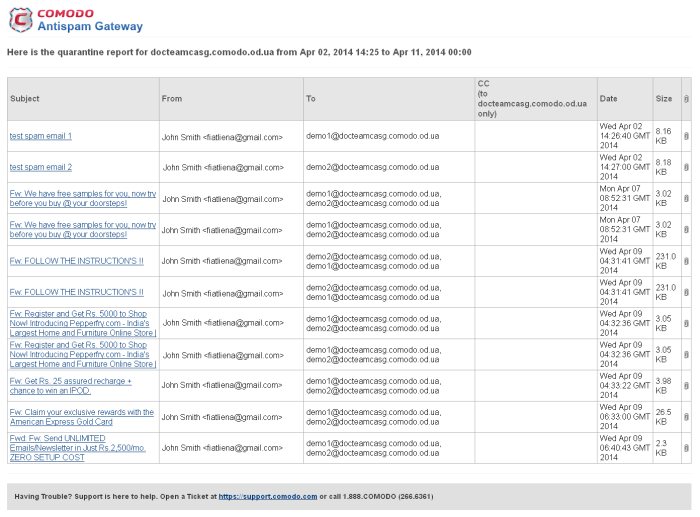
- Click the 'Subject' of a mail to open the mail in a new CASG window. You need to login to CASG to read the mail in the new window.