Comodo Help
Find the desired product help
Comodo Antispam Gateway

Comodo Antispam Gateway

User Guide ver 1.10

English

Print Help Download Help
The User Interface > The Dashboard Area > Incoming
  • Introduction To Comodo Antispam Gateway
  • How To...Tutorials
    • How To Login To CASG
    • How To Get A New Password
    • How To Manage Your Quarantined Mails
    • How To Use Filter Options In The Quarantined Emails Interface
    • How To Check When An Expected Email Is Not Received
    • How To Retrieve An Email Which Had Virus Attachment
    • How To Subscribe For Periodical Quarantine Report Summary
    • How To Perform A Log Search Of Your Incoming Emails
    • How To Add Or Remove A User From Recipient Whitelist
    • How To Report Spam Emails
    • How To Perform A Log Search Of Your Outgoing Emails
  • The User Interface
    • Logging-in To The User Interface
    • The Dashboard Area
      • Incoming
        • Quarantine
        • Report Spam
        • Log Search
      • Outgoing
        • Log Search
    • User Account Management
      • Managing Login Password And Whitelist/Blacklist Settings
      • Managing User Subscription For Periodical Summary Reports
  • CASG Reports - An Overview
  • About Comodo

Incoming


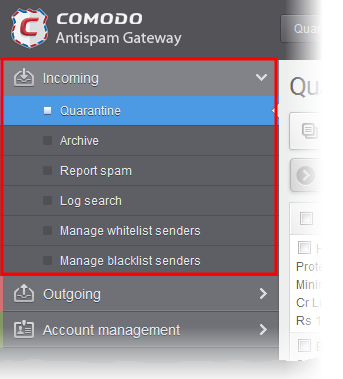
In the 'Incoming' area, an user can view, release or delete quarantined emails, perform log search of incoming mails.


Note: Depending on the permission level configured for your email account by your administrator, the icons in the interface may vary. For example, the Quarantine icon may not be available if this feature is not enabled for you.


Click the following links for more details:

  • Quarantine
  • Report Spam
  • Log Search 
Terms and Conditions Privacy Policy

© Comodo Group, Inc. 2013. All rights reserved.