
Comodo Help
Find the desired product help
Comodo Antivirus For Linux

Comodo Antivirus For Linux

Version 1.0

English

Print Help Download Help
More Options - Introduction > Preferences > Parental Control Settings
  • Introduction To Comodo Antivirus For Linux
    • Special Features
    • System Requirements
    • Installation
    • Starting Comodo Antivirus
    • Comodo Antivirus - The Summary Screen
    • Comodo Antivirus - Navigation
    • Understanding Alerts
  • Antivirus Tasks - Introduction
    • Run A Scan
    • Update Virus Database
    • Quarantined Items
    • View Antivirus Events
    • Submit Files To Comodo For Analysis
    • Scheduled Scans
    • Scan Profiles
    • Scanner Settings
      • Real Time Scanning
      • Manual Scanning
      • Scheduled Scanning
      • Exclusions
  • Mail Gateway Tasks - Introduction
    • Host Setting
    • Certificates
    • Antispam
    • SMTP Configuration
      • SMTP Gateway
        • Configuring For Inbound Mail Filtering
        • Configuring For Outbound Mail Filtering
      • Inner SMTP Filter
      • Cmdtcpd
      • Qmail
      • Milter
    • View Mail Events
    • Scanner Settings
  • More Options - Introduction
    • Preferences
      • Language
      • Parental Control Settings
      • Themes
      • Log Settings
      • Connection Settings
      • Update Settings
    • Manage My Configurations
      • Comodo Preset Configuration
      • Importing/Exporting And Managing Personal Configurations
    • Diagnostics
    • Check For Updates
    • Browse Support Forums
    • Help
    • About
  • About Comodo

Parental Control Settings


The 'Parental Control' tab allows you to configure password protection for CAVL.
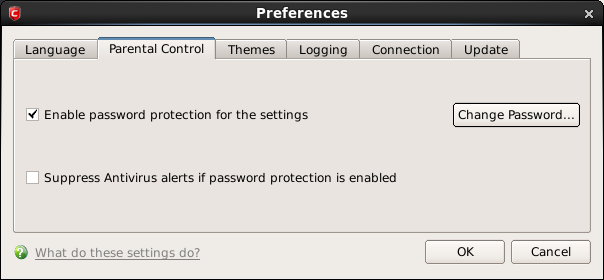


  • Enable password protection for settings - Selecting this option activates password protection for all important configuration sections and wizards within the interface. If you choose this option, you must first specify and confirm a password by clicking the 'Change Password... ' button. You are asked for this password every time you try to access important configuration areas (Antivirus and Mail Gateway Tasks area require this password before allowing you to view or modify their settings).
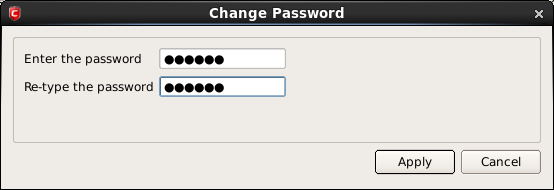


This setting is of particular value to parents, network administrators and administrators of shared computers to prevent other users from modifying critical settings and exposing the machine to threats.

  • Suppress Antivirus alerts when password protection is enabled - If selected, no Antivirus Alerts are displayed when password protection is enabled. Parents and network admins may want to enable this setting if they do not want users to be made aware when an Antivirus alert has been triggered. For example, a virus program may be attempting to copy itself and infect user's computer without permission or knowledge of the user. Usually, the Antivirus would generate an alert and ask the user how to proceed. If that user is a child or an inexperienced user then they may unwittingly click 'allow' just to 'get rid' of the alert and/or gain access to the website in question - thus exposing the machine to attack. Selecting this option blocks the activity of the virus but does not generate an alert.

Terms and Conditions Privacy Policy

© Comodo Group, Inc. 2013. All rights reserved.