


Discovered AI Tool Catalog
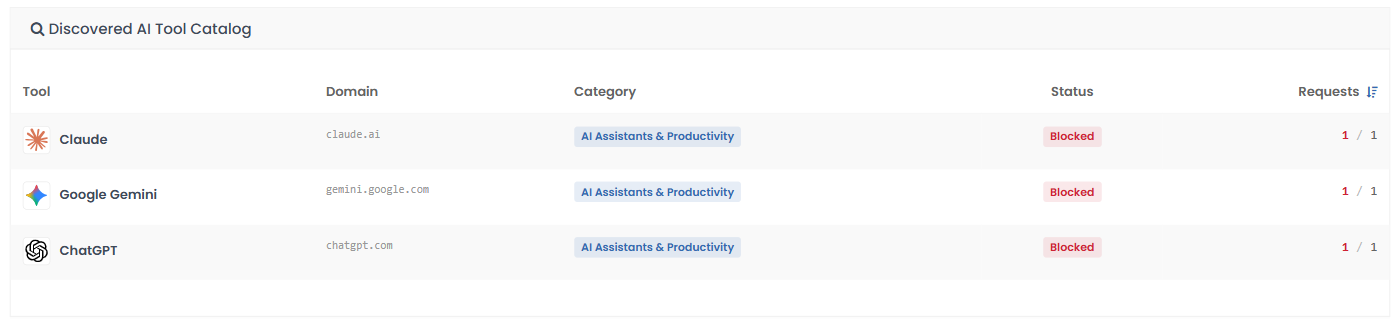
The catalog lists the AI tools that had traffic in the selected time range.
Discovered AI Tool Catalog - Table of Column Descriptions
| Column Header | Description |
| Tool | The name and logo of the AI tool. |
| Domain | The domain of the tool, for example claude.ai. |
| Category | The AI category the tool belongs to. |
| Status | Whether requests to the tool are blocked, for example 'Blocked'. |
| Requests | The request count. The red first number is blocked requests and the second is total requests, so '1 / 1' means one request, and it was blocked. |
View the requests for a tool
- Click the row of the tool.
- A drawer opens on the right with the tool's name, domain and category. Three tiles show 'Total', 'Blocked' and 'Allowed' requests.
- The table below lists the events. A footer shows paging, for example '1-1 of 1 events'. The drawer shows up to 10,000 events.
- The drawer has its own 'Export CSV' button.
- Click the X at the top right to close the drawer.
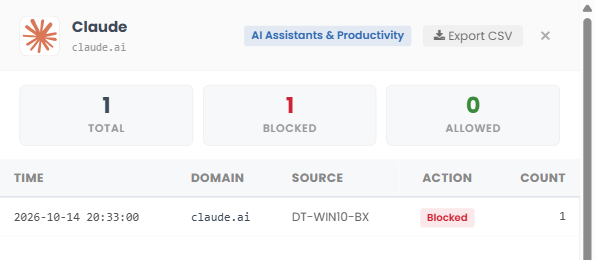
Drawer - Table of Column Descriptions
| Column Header | Description |
| Time | The date and time of the request. |
| Domain | The domain that was requested. |
| Source | The device name if the request came from a roaming agent, otherwise the source IP address. |
| Action | Whether the request was 'Blocked' or allowed. |
| Count | The number of requests in the event. |