Comodo Help
Find the desired product help
Comodo Antivirus For MAC

Comodo Antivirus For MAC

Version 1.1

English

Print Help Download Help
Antivirus Tasks-Introduction
  • Introduction To Comodo Antivirus
    • System Requirements
    • Installation
    • Starting Comodo Antivirus
    • Comodo Antivirus -The Summary Screen
    • Comodo Antivirus - Navigation
    • Understanding Alerts
    • How To... Tutorials
      • How To Scan Your Computer For Viruses
      • How To Configure Database Updates
      • How To Quickly Set Up Security Levels
      • How To Password Protect Your CAV Settings
      • How To Run An Instant Antivirus Scan On Selected Items
      • How To Create A Scheduled Scan
      • How To Restore Incorrectly Quarantined Item(s)
      • How To Submit Quarantined Items To Comodo For Analysis
      • How To Switch Off Automatic Software And Antivirus Updates
      • How To Temporarily Suppress Alerts While Playing A Game
      • How To View Antivirus Reports
  • Antivirus Tasks-Introduction
    • Run A Scan
    • Update Virus Database
    • Quarantined Items
    • View Antivirus Events
    • Submit Files To Comodo For Analysis
    • Scheduled Scans
    • Scan Profiles
    • Scanner Settings
      • Real Time Scanning
      • Manual Scanning
      • Scheduled Scanning
      • Exclusions
  • More Options-Introduction
    • Preferences
      • General Settings
      • Parental Control Settings
      • Language
      • Log Settings
      • Update Settings
    • Manage My Configurations
      • Comodo Preset Configurations
      • Importing/Exporting And Managing Personal Configurations
    • Diagnostics
    • Check For Updates
    • Browse Support Forums
    • Help
    • About
  • About Comodo

Antivirus Tasks-Introduction


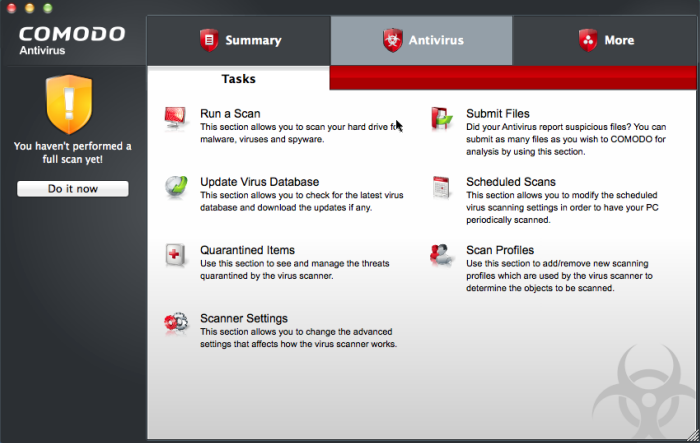
The Antivirus Task Center allows you to run custom, on-demand virus scans and to configure how you want the antivirus scanner to behave.


This area also allows you to alter scan settings for each scan type and to use the fully featured scheduler to run scans according to a time table of your choice. Other features include the ability to create custom scan profiles, view/export event logs, specify update settings, submit files for analysis and to view any quarantined files.


The Antivirus tasks center can be accessed at all times by clicking the 'Antivirus' tab  .


Click the links below to see detailed explanations of each area in this section.

  • Run a Scan

  • Update Virus Database

  • Quarantined Items

  • View Antivirus Events

  • Submit Files

  • Scheduled Scans

  • Scan Profiles

  • Scanner Settings


Comodo Antivirus for MAC User Guide | © 2011 Comodo Security Solutions Inc. | All rights reserved.

Terms and Conditions Privacy Policy

© Comodo Group, Inc. 2013. All rights reserved.