
Comodo Help
Find the desired product help
Managed AI

Managed AI

Service Desk IT AI Agent- Admin Help guide

English

Print Help
Service Desk IT AI Agent — Admin Help Guide
  • Service Desk IT AI Agent — Admin Help Guide
    • Dashboard
    • Integrations
    • Ticket Management
    • Try Agent
    • Recommended Initial Setup
    • Frequently Asked Questions (FAQ)

Service Desk IT AI Agent — Admin Help Guide


The default ITSM agent is shown in the current UI as Service Desk IT AI Agent. It combines Service Desk ticket handling, AI conversations, external automation integrations, playbooks, approval workflows, communication channels, organizational knowledge, and testing in one agent.


How the main components fit together



Key concept: Connecting an integration and enabling a tool are separate steps. For example, Office 365 is connected from Integrations → Automations; the relevant Office 365 tools can then be used from Playbooks.


Accessing the Service Desk IT AI Agent

Open the default ITSM agent from Managed AI and enter its management workspace.
  • Sign in to the Xcitium portal.
  • Open Managed AI.
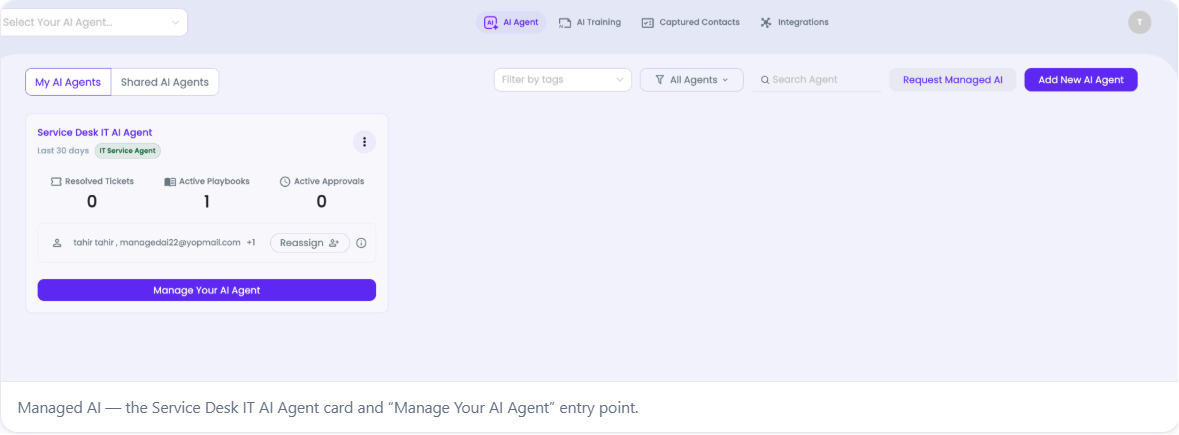
  • Under My AI Agents, locate Service Desk IT AI Agent.
  • Click Manage Your AI Agent to open the agent workspace.
The agent card gives a quick summary of recent activity, including resolved tickets, active playbooks, and active approvals.


Our Products
  • Free Antivirus
  • Free Internet Security
  • Website Malware Removal
  • Free Anti-Malware
  • Anti-Spam (Free Trial)
  • Windows Antivirus
  • Antivirus for Windows 7
  • Antivirus for Windows 8
  • Antivirus for Windows 10
  • Antivirus for MAC
  • Antivirus for Linux
  • Free Endpoint Security
  • Free ModSecurity
  • Free RMM
  • Free Website Malware Scanner
  • Free Device Manager for Android
  • Free Demo
  • Network Security
  • Endpoint Protection
  • Antivirus for Android
  • Comodo Antivirus
  • Wordpress Security
Cheap CDN
  • Bootstrap CDN
  • Semantic UI CDN
  • Jquery CDN
  • CDN Plans
  • CDN
  • Free CDN
Enterprise
  • Patch Management Software
  • Patch Manager
  • Service Desk
  • Website Down
  • Endpoint Protection Solutions
  • Website Security Check
  • Remote Monitoring and Management
  • Website Security
  • Device Manager
  • ITSM
  • CRM
  • MSP
  • Android Device Manager
  • MDR Services
  • Managed IT Support Services
  • Free EDR
Free SSL Certificate
Support Partners Terms and Conditions Privacy Policy

© Comodo Group, Inc. 2026. All rights reserved.