


View Browsing History
Comodo Dragon keeps a record of websites that you have visited in the past 10 weeks.
|
Note: History is not saved when Dragon is in incognito mode. In addition, Dragon does not store pages from secure websites. |
View your browsing history
-
Click the menu
 at top-right corner
-
Select 'History' from the menu
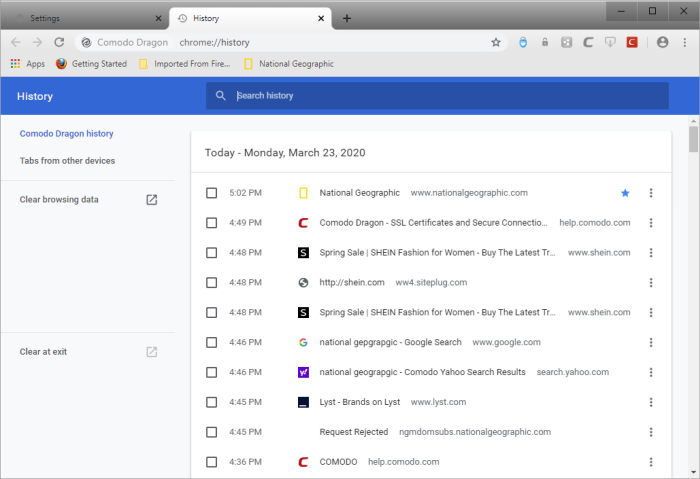
The 'History' page opens:
- Click the hamburger icon at top-left to open the 'History' menu
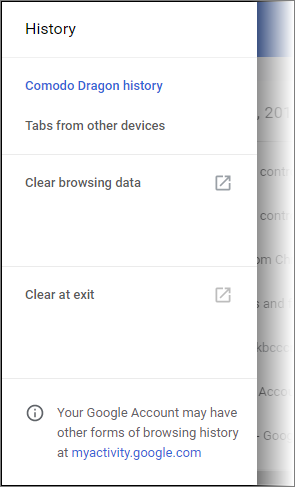
- Click
'Clear browsing data' to delete all browsing data or delete only
selected items. See Delete
Browsing History if you need help with this
- Click 'Tabs from other devices' to sync Comodo Dragon tabs on your other devices with this installation of Dragon. Note: to use this option, you need to sign in to Comodo Dragon
- View pages that you have visited in your present browsing session by clicking and holding down the forward and backward arrows adjacent to the address bar
- Use the 'Search History' context menu to search more visited links from that site
- 'Clear at exit' to delete your browsing history when you close the browser. Downloaded files, searches and cookies are also deleted
- Check the box next to the webpage you want to delete from the list
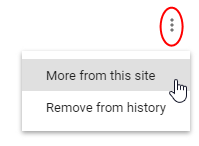
- Click the ellipsis then select 'More from the history' to view more results from the current web page
- Click the ellipsis then select 'Remove from history' to delete a single entry.
Further reading related to the topic of this page: