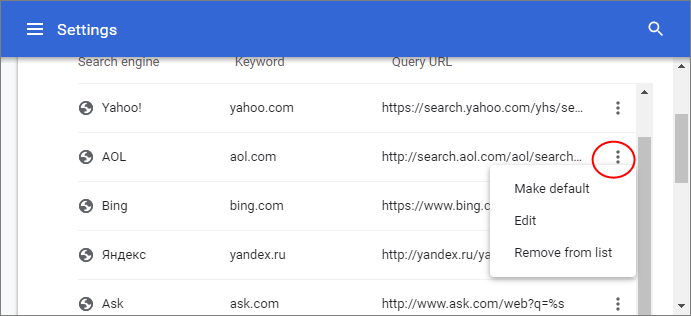
Manage your Search Engines
- When
you use a search engine, Comodo Dragon automatically recognizes it
and adds to its list of usable engines.
- You
can manually add search engines or edit/remove search engines or
specify which engine Dragon should use by default.
- The
address bar (omnibox) can be used as a search box.
- Dragon
automatically uses Yahoo/Yandex by default, but you can configure
another default search engine.
- Click the menu button
 at top-right
- Select
'Settings' > scroll to the 'Search engine'
- Click
the drop-down menu to view a list of available search engines
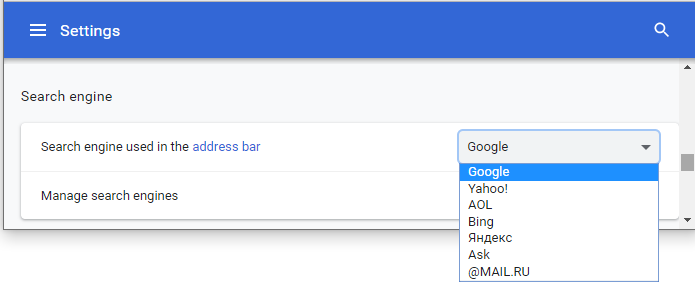
- Select
the search engine that you want to set
as default from the drop-down and use it as default in future
- Click
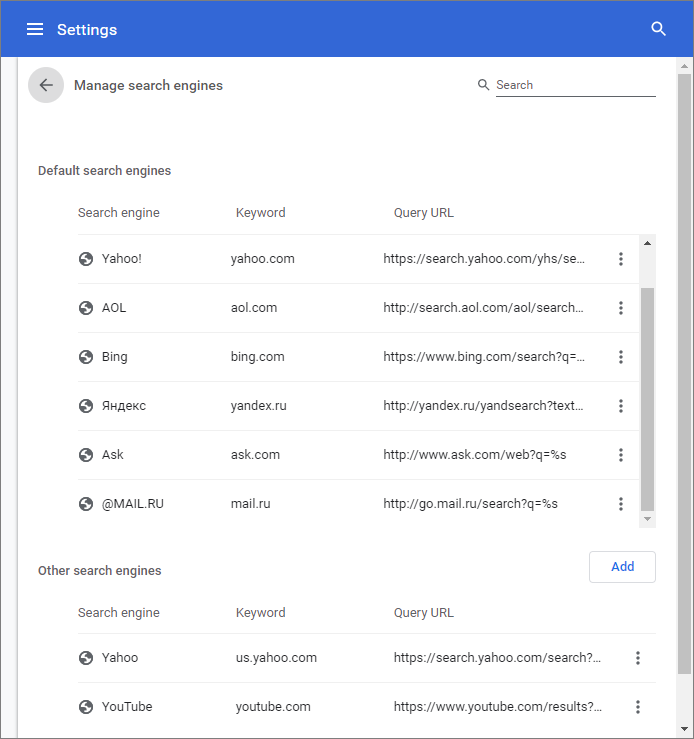
the 'Manage search engines' to open the search engines
configuration screen:
- Click
the 'More actions' ellipsis and choose 'Make
default' to set a default search engine as default
The 'Other
search engines' area displays search engines that are used by Dragon
and added automatically. You can also add search engines manually in
this section.
- Click
'Add' button, fill out the fields

- Click
'Add' to add the engine
- Select
'More actions' ellipsis > click 'Edit' to edit a search engine
- Select
'More actions' ellipsis > click 'Remove from list' to delete a
search engine
- Select
'More actions' ellipsis > click 'Make default' to set a default
search engine as default under 'Other search engines'.