
Comodo Help
Find the desired product help
Comodo Antivirus For Linux

Comodo Antivirus For Linux

Version 1.0

English

Print Help Download Help
Mail Gateway Tasks - Introduction > SMTP Configuration > SMTP Gateway
  • Introduction To Comodo Antivirus For Linux
    • Special Features
    • System Requirements
    • Installation
    • Starting Comodo Antivirus
    • Comodo Antivirus - The Summary Screen
    • Comodo Antivirus - Navigation
    • Understanding Alerts
  • Antivirus Tasks - Introduction
    • Run A Scan
    • Update Virus Database
    • Quarantined Items
    • View Antivirus Events
    • Submit Files To Comodo For Analysis
    • Scheduled Scans
    • Scan Profiles
    • Scanner Settings
      • Real Time Scanning
      • Manual Scanning
      • Scheduled Scanning
      • Exclusions
  • Mail Gateway Tasks - Introduction
    • Host Setting
    • Certificates
    • Antispam
    • SMTP Configuration
      • SMTP Gateway
        • Configuring For Inbound Mail Filtering
        • Configuring For Outbound Mail Filtering
      • Inner SMTP Filter
      • Cmdtcpd
      • Qmail
      • Milter
    • View Mail Events
    • Scanner Settings
  • More Options - Introduction
    • Preferences
      • Language
      • Parental Control Settings
      • Themes
      • Log Settings
      • Connection Settings
      • Update Settings
    • Manage My Configurations
      • Comodo Preset Configuration
      • Importing/Exporting And Managing Personal Configurations
    • Diagnostics
    • Check For Updates
    • Browse Support Forums
    • Help
    • About
  • About Comodo

SMTP Gateway (any MTA)


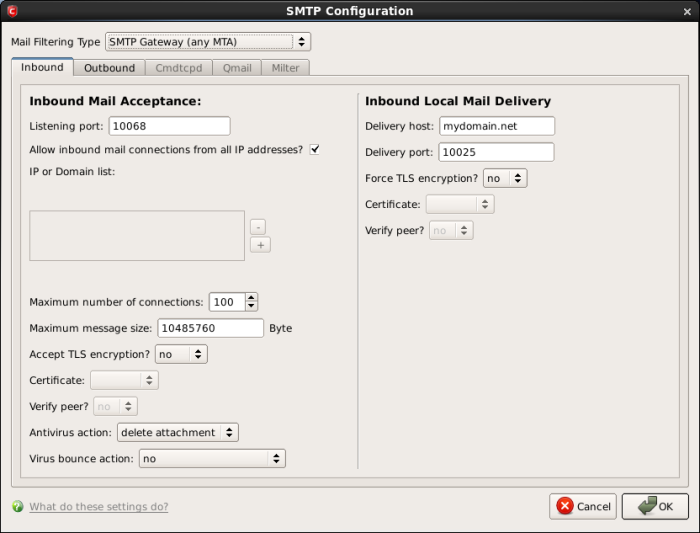
The SMTP Gateway filtering interface allows you to configure the settings for filtering all incoming and outgoing mails for your domain, irrespective of the Mail Transfer Agent (MTA) you are using. The mails will be checked for spam, viruses and so on, before passing on to the mail server for delivery to the recipients.


To configure filter settings for all inbound and outbound mails, select 'SMTP Gateway (any MTA)' from the 'Mail Filtering Type' drop-down box.


Click the links below for more information

  • Configuring for Inbound Mail Filtering

  • Configuring for Outbound Mail Filtering

Terms and Conditions Privacy Policy

© Comodo Group, Inc. 2013. All rights reserved.