
Comodo Help
Find the desired product help
Xcitium Secure Internet Gateway

Xcitium Secure Internet Gateway

Admin Guide Version

English

Print Help Download Help
Shadow AI
  • Introduction To Xcitium Secure Internet Gateway
    • Purchase A License
    • Login To Secure Internet Gateway
    • Setup Options Explained
      • Tutorial To Add Networks To Secure Internet Gateway
      • Tutorial To Add Roaming Endpoints To Secure Internet Gateway
      • Tutorial To Add Mobile Devices
      • Tutorial To Deploy XSIG Virtual Appliances
      • Setup Wizard - Add Networks
      • Setup Local Resolver Virtual Machines And Import Sites
  • The Admin Console
  • The Dashboard
    • Web Overview
    • Security Overview
    • View Logs
  • Add Networks, Roaming Endpoints And Mobile Devices
    • Add Networks
    • Add Roaming Endpoints
    • Add Mobile Devices
    • Manage Imported Sites And Virtual Appliances
      • Add Internal Networks
      • Add Internal Domains
  • Manage XSIG Rules
    • Manage Security Rules
    • Manage Category Rules
    • Manage Domain Blacklist And Whitelist
    • Manage Block Pages
    • Manage Cloud Browser Settings
  • Apply Policies To Networks And Roaming/Mobile Devices
  • Domain Classification Requests
  • View Protection Details By Customer
  • Reports
  • Shadow AI
    • Shadow AI Summary
    • Discovered AI Tool Catalog
    • Top AI Devices, Mobile Agents And Networks
    • Recent AI Blocks
    • Export Shadow AI Data
    • Block AI Tools
    • How Shadow AI Counts Requests
  • Read Testimonials
  • View Account Details
  • Appendix - Ports, IP Nos Allowed For SIG Roaming Agent And Local Resolver
  • About Xcitium Security Solutions

Shadow AI


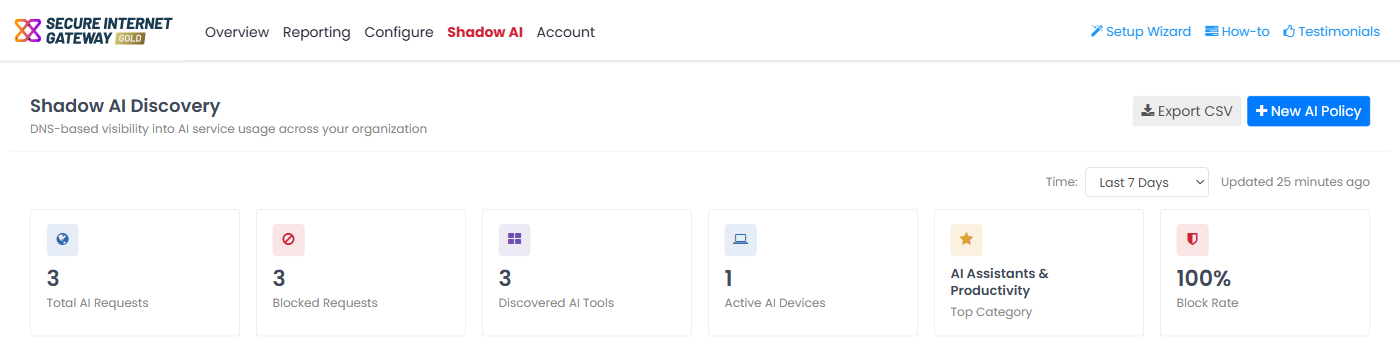
Click 'Shadow AI' in the top-menu to open the 'Shadow AI Discovery' page. On a narrow screen the menu shows icons, and 'Shadow AI' is the eye icon.


Shadow AI gives you DNS-based visibility into the AI services your users reach. It shows which tools are in use (such as ChatGPT, Claude, Gemini, Grok, Perplexity and Harvey, and more than 30 others), how heavily, from which devices and networks, and how many requests are blocked.


Shadow AI reads the DNS traffic that already passes through Secure Internet Gateway, so you do not install anything. Use it to see unsanctioned AI use before you decide whether to block, allow or govern it.


The page is divided into the following areas:

  • Summary tiles - Six figures for the selected time range: total and blocked requests, tools, devices, top category and block rate.
  • AI Traffic Trend - Allowed and blocked AI requests over time.
  • Category Distribution - The share of AI requests in each AI category.
  • Discovered AI Tool Catalog - Every AI tool with traffic, with its request count and status.
  • Top AI Devices - Devices ranked by AI request volume.
  • Recent AI Blocks - Recent blocked AI requests.
  • Top AI Networks - Networks ranked by AI request volume.
  • Top AI Mobile Agents - Mobile devices ranked by AI request volume.


At the top right, 'Export CSV' exports the data and 'New AI Policy' starts a wizard that adds AI categories to a category rule. Possible time ranges are Last 1 Hour, Last 24 Hours and Last 7 Days. MSP customers can view the Shadow AI statistics of a particular customer.
Xcitium_Secure_Internet_Gateway_1.png


Blocking is done through policies, as explained in 'Block AI Tools'.


See the following sections for more information

  • Shadow AI Summary
  • Discovered AI Tool Catalog
  • Top AI Devices, Mobile Agents and Networks
  • Recent AI Blocks
  • Export Shadow AI Data
  • Block AI Tools
  • How Shadow AI Counts Requests

Our Products
  • Free Antivirus
  • Free Internet Security
  • Website Malware Removal
  • Free Anti-Malware
  • Anti-Spam (Free Trial)
  • Windows Antivirus
  • Antivirus for Windows 7
  • Antivirus for Windows 8
  • Antivirus for Windows 10
  • Antivirus for MAC
  • Antivirus for Linux
  • Free Endpoint Security
  • Free ModSecurity
  • Free RMM
  • Free Website Malware Scanner
  • Free Device Manager for Android
  • Free Demo
  • Network Security
  • Endpoint Protection
  • Antivirus for Android
  • Comodo Antivirus
  • Wordpress Security
Cheap CDN
  • Bootstrap CDN
  • Semantic UI CDN
  • Jquery CDN
  • CDN Plans
  • CDN
  • Free CDN
Enterprise
  • Patch Management Software
  • Patch Manager
  • Service Desk
  • Website Down
  • Endpoint Protection Solutions
  • Website Security Check
  • Remote Monitoring and Management
  • Website Security
  • Device Manager
  • ITSM
  • CRM
  • MSP
  • Android Device Manager
  • MDR Services
  • Managed IT Support Services
  • Free EDR
Free SSL Certificate
Support Partners Terms and Conditions Privacy Policy

© Comodo Group, Inc. 2026. All rights reserved.