The Dashboard Area
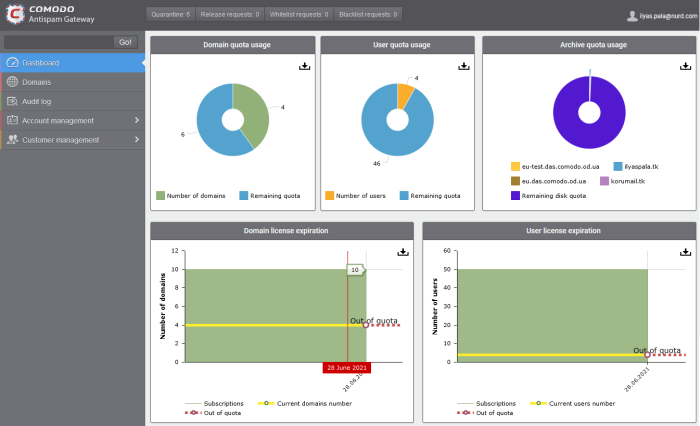
The dashboard contains charts with data about your Antispam Gateway deployment. You can export any chart to pdf by clicking the download icon in the top-right corner of each panel.
|
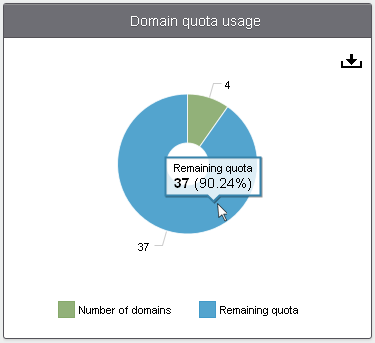
Domain Quota Usage The number of domains used, and the number remaining on your current license. Each domain that you set up for spam filtering will take one domain from the pool remaining on your license.
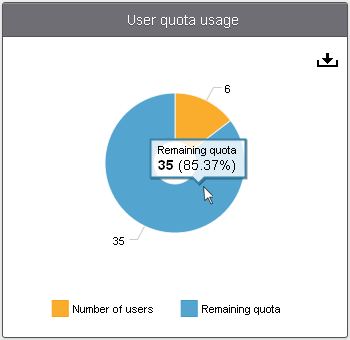
User Quota Usage Number of users protected by spam filtering, and the number remaining on your current license. Each user that you protect with spam filtering will take one user from the pool remaining on your license.
|
|
|
|
|
|
Archive Quota Usage
The quantity of mail archive space already used for each domain, and the amount remaining on your current license.
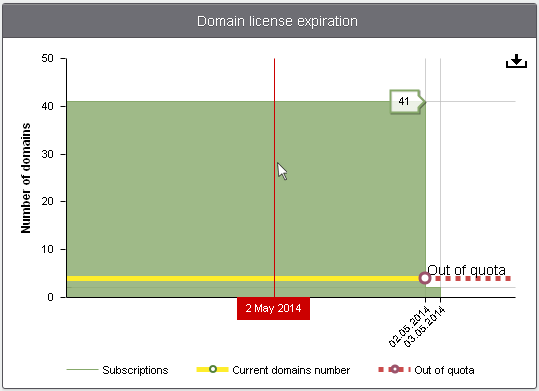
Domain License Expiration Quantity of domains and
domain license expiry dates. Y axis – Domain count X axis – Timeline Green bars – Total number of domains allowed by all unexpired licenses. Yellow line – Actual number of domains active on your account. Out-of-quota – Shown if the actual number of domains is greater than the total allowed by your licenses. Red line – Date when a license is due to expire. Place your mouse cursor over
any bar to see when the license is set to expire. |
|
|
|
|
|
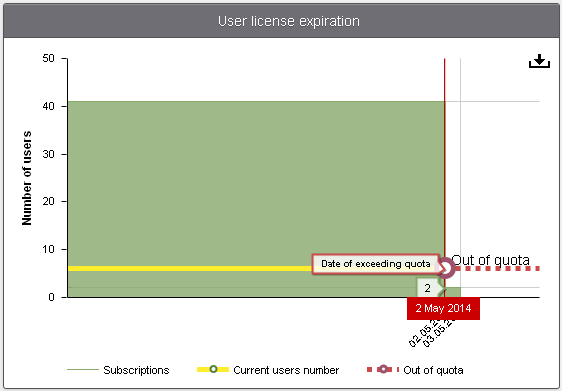
User License Expiration Quantity of users and
license expiry dates. Y axis – User count X axis – Timeline Green bars – Total number of users allowed by all unexpired licenses. Yellow line – Actual number of users active on your account. Out-of-quota – Shown if the actual number of users is greater than the total allowed by your licenses. Red line – Date
when a license is due to expire. Place your mouse cursor over any bar to see when the license is set to expire.
|
|