


Incoming Spam Detection Settings
This area lets you configure the sensitivity of the spam filter, spam notation, and quarantine retention times.
- CASG runs several rules on each email as it passes through the spam filters.
- Each rule checks the mail for a specific spam attribute. The rule will assign a score to a mail based on the degree to which the mail exhibits that attribute.
- A message's total spam score depends on the weighted value of all rules combined.
For example, if you set the spam threshold to 0.33, any mail that has a score higher than 0.33 will be treated as spam and quarantined. The higher the threshold, the more likely that some spam messages may get delivered. The maximum possible threshold is 1. We advise you to test settings for a week to arrive at the best setting for your company.
Configure incoming spam detection
- Click 'Incoming' on the left and choose 'Spam detection Settings'
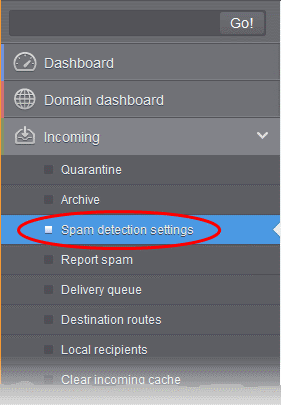
This opens the spam detection interface for the selected domain:
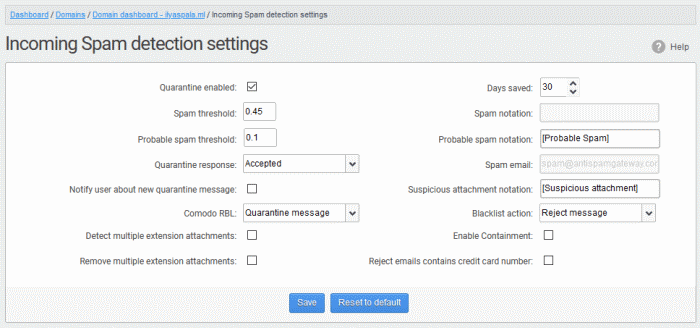
- Quarantine enabled
- Enabled - Mail identified as spam is quarantined.
- Disabled - Spam is not quarantined but is delivered with a modified subject line. You can set the text which is appended to the subject line in the Probable Spam notation / Spam Notation fields.
- Messages identified as 'probable spam' are always sent to the recipient, and not quarantined, even if this option is enabled. See 'Probable spam threshold setting' to set the sensitivity.
- Days saved - Enter the number of days that you want mails to be retained in quarantine. The maximum number of days that can be set is 9999. Quarantined mails that are not checked, released or deleted within the stipulated days will be automatically deleted from quarantine.
- Spam threshold - Enter any value between 0.1 and 1.0. All mails with a score above that value are classed as spam and quarantined as explained above. Please note this value should be always higher than 'Probable spam threshold' value.
- Spam notation - The prefix that will be appended to the subject line of all ‘Spam’ emails sent to users. For example, "[Spam] Order two Rolex watches and get a free carton of Viagra” – where [Spam] is the text entered in the 'Spam notation' field. Note - this only applies IF quarantine has been disabled (i.e. If the ‘Quarantine Enabled’ box is not checked).
- Probable spam threshold - Enter any value between 0.0 and the value entered in Spam threshold field. All mails that are having a score value above that is set in this field will be identified as unsure mails and will be delivered to recipients with the subject line as set in the Probable Spam notation / Spam Notation field.
- Probable spam notation - The prefix
that will be appended to the subject line of all ‘probable spam’
emails sent to users. For example, “[Potentially Spam]
Cheap deals on Dell computers” – where [Potentially Spam] is the text entered in the ‘Probable spam notation’ field.
- Quarantine response – Choose the response to be sent by CASG to the SMTP server that delivered a message in the event that a mail is identified as spam.
Note – If you have enabled quarantine functionality, then spam/malicious mail will be quarantined (and not delivered to the recipient) regardless of your choice here. These options merely determine what message CASG will send back to the SMTP mail server. The available options are:
- Rejected - Will inform the SMTP server that the email has been rejected by CASG and placed in quarantine.
- Accepted - The email has passed the CASG spam filters and detected as a spam will be placed in quarantine in silent mode.
- Spam email - Displays the email address to which the mails reported as spam from the 'Report Spam' interface and the 'Archive' interface will be forwarded. By default, mails reported as spam by the administrators will be forwarded to [email protected] for analysis by experts at Comodo. Once a reported mail is confirmed as spam, Comodo will update its mail filters to quarantine similar mails in future. Refer to the explanations under Manage Archived Mails and Report Spam for more details on forwarding the suspicious mails for analysis.
- Notify user about new quarantine message – Select this option if you wish CASG to send a notification email to the intended recipient, if a spam email addressed to the recipient is intercepted by CASG and moved to Quarantine. The notification email will contain a link to the email and a link for the user to login to the CASG User interface.
- The recipient will be able to click the link to directly read the email, without logging-in to CASG. The lifetime of the link is one day. If the user has not clicked the link within a day, the link will expire.
- If the user needs to respond to or delete the quarantined email, the user can click the next link to login to CASG, view their quarantined mails and carry out their desired actions
-
Suspicious attachment notation - The prefix that will be appended to the subject line of all mails identified with suspicious attachments like malware and macros and forwarded to the recipient or to a different email address, a configured in the Domain Rules. Refer to the explanation under Rules in the section Domain Rules for more details. For example, "[Suspicious attachment] Your lucky draw" - where [Suspicious attachment] is the text entered in the 'Suspicious attachment notation' field.
- Comodo RBL – Comodo's Real-time Blackhole List (RBL) is a blacklist of locations which are known to send spam. This list is continuously updated by Comodo.
- Quarantine message – If the IP address of the message sender is in the RBL, then the incoming email will be quarantined.
- Reject message - If the IP address of the message sender is in the RBL, then the incoming email will be rejected.
- Disabled – CASG filters will not check Comodo RBL.
- Enable Containment – Containment is a security technology whereby email attachments with an 'unknown' trust rating are run inside a secure, sandbox environment. Note – This feature is available for EU customers. For US customers, we are in the process of migrating to a new platform. Once the process is complete, this feature will be available for US customers also.
- Files in containment are run with heavily restricted privileges. They cannot access other processes, cannot access important system files, and cannot access user data.
- This setting will contain unknown attachments of the following file types - .exe, .pdf, .doc, .docx, .xls, .xlsx, .ppt, .pptx, .zip, .rar, .tar.gz, tar.bz2.
- From the user's point-of-view, the attachment opens and runs as normal on their computer. This provides a groundbreaking combination of high security with no loss of usability.
- Background - Each email attachment is checked by our filters and awarded a trust rating. This can be 'Safe' (the file is on our whitelist), 'Malware' (the file is on our blacklist), or 'Unknown' (the file does not yet have a trust rating).
- Because unknown files could be malware, we run them in the container on the endpoint while we test them to establish their safety. If the tests find the file is safe then it is released from containment. If the tests find the file is harmful then it is quarantined.
- You can disable this setting for particular users if required. See 'User Account Management' for more info on this.
- Detect multiple extension attachments - Files of more than one file type or extensions. For example, 'file_name.doc.exe'. If enabled, CASG quarantines messages with these types of attachments.
- Remove multiple extension attachments - If enabled, message is delivered to the recipient without the attachment.
- Reject emails contains credit card number - If enabled, emails that contain credit card numbers are rejected. Credit card numbers have a certain structure that CASG filters can recognize, so emails containing random numbers are not rejected.
- Click 'Save' for your settings to take effect.
- Click 'Reset to default' to undo any changes.