


Vulnerabilities
- Click 'Endpoint Compliance' > 'Vulnerabilities' to open this interface.
The 'Vulnerabilities' page lists the published vulnerabilities found across your estate. It is laid out like the 'Problems' page, with a category drop-down above the list and a second card below it for the findings that are registry settings rather than software.
You can narrow the list to a category of vulnerability or to an operating system, filter and export it, and suppress a finding you have decided not to act on.
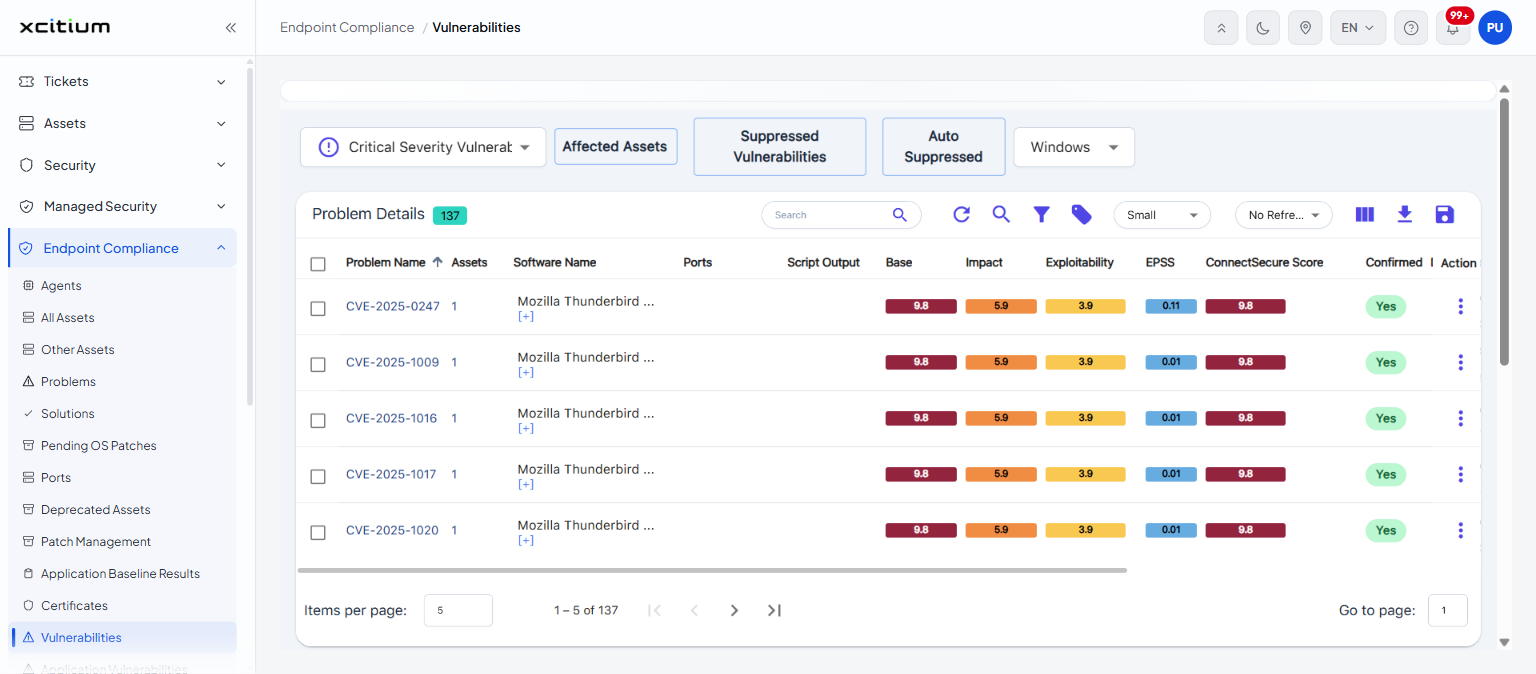
Controls above the list
| Control | Description |
| Problem category | A drop-down that chooses which kind of vulnerability the list shows. It offers the same categories as the 'Problems' page. |
| Affected Assets | A button beside the category drop-down. |
| Suppressed Vulnerabilities | A button beside it. |
| Auto Suppressed | A button beside it. |
| Operating system | A drop-down whose options are 'Windows', 'Mac', 'Linux' and 'Others'. The default is 'Windows'. |
Columns
The main list is headed 'Problem Details' with a chip showing how many findings it holds.
| Column | Description |
| (check box) | Selects the row. |
| Problem Name | The identifier of the finding, usually a CVE number. |
| Assets | How many of your assets the finding affects. |
| Software Name | The software the finding belongs to. |
| Ports | The ports involved. |
| Script Output | What the check script reported. |
| Base | The base severity score. |
| Impact | The impact sub-score. |
| Exploitability | The exploitability sub-score. |
| EPSS | The probability that the finding will be exploited. |
| ConnectSecure Score | The score the scanning service assigns to the finding. |
| Confirmed | Whether the finding has been confirmed. |
| Description | A description of the finding, with a 'Show More' link where it is long. |
| First Vulnerability Discovered | When the finding was first seen. |
| Action | Opens the row menu. |
Registry Vulnerabilities
Below the main list is a second card. Five buttons choose its view: 'Registry', 'Remediated Registry', 'Suppressed Registry', 'Installed Driver Vulnerabilities' and 'Installed Driver Remediations'. The card is headed 'Registry Vulnerabilities' with a chip showing how many there are.
| Column | Description |
| (check box) | Selects the row. |
| Assets | How many assets the finding affects. |
| Problem Name | The name of the registry finding. |
| Vul ID | Its vulnerability identifier, usually a CVE number. |
| Description | A description of the finding. |
| KB/Fix | The change that resolves it. |
| Severity | How severe it is, shown as a coloured badge. |
| Base | The base severity score. |
| EPSS Score | The exploitation probability. |
| Exploitability | The exploitability sub-score. |
| Impact | The impact sub-score. |
| Confirmed | Whether the finding has been confirmed. |
| Action | Opens the row menu. |
See 'Problems' for the same findings presented as problems, and 'Solutions' for the fixes.