


Assign a Ticket from the Unassigned Queue
- Click 'Tickets' > 'Technician Queue' > 'Unassigned', then click 'Assign Ticket' on any row to open this dialog.
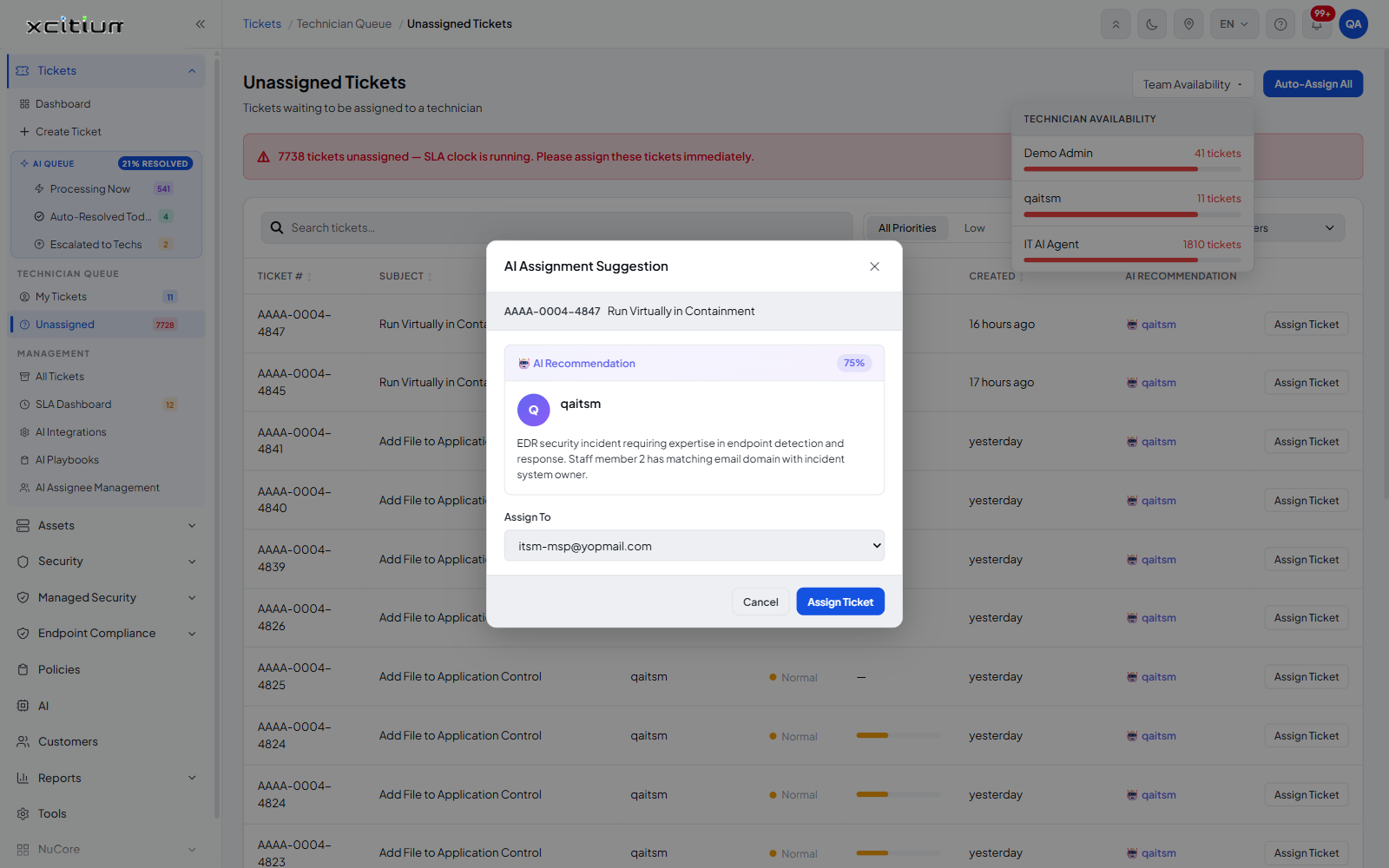
The dialog is headed 'AI Assignment Suggestion'. It puts the AI's recommended technician, its confidence in that recommendation and its reasoning in front of you, then lets you accept the suggestion or pick someone else.
You can read why the AI chose that technician, change the assignee, and either apply the assignment or cancel out without changing anything.
What the dialog shows
| Element | Description |
| Title | 'AI Assignment Suggestion', with an '✕' button at the right that closes the dialog. |
| Ticket identity | The ticket number and subject, for example 'AAAA-0004-4847 / Run Virtually in Containment'. |
| 🤖 AI Recommendation | A block holding the AI's confidence as a percentage, the avatar and name of the recommended technician, and the reasoning behind the choice. |
| Reasoning text | A short explanation in plain language, for example that the incident needs endpoint detection and response expertise and that the suggested person's email domain matches the system owner. |
The fields
| Field | Type | Options / default | Required |
| Assign To | Dropdown | 'Select a technician…' plus one entry per technician in the account. The AI's recommended technician is pre-selected. | Yes |
The buttons
| Button | Description |
| Cancel | Closes the dialog without assigning the ticket. |
| Assign Ticket | Applies the assignment and closes the dialog. |
Assign a ticket
- Click 'Tickets' > 'Technician Queue' > 'Unassigned'.
- Find the ticket you want to hand out. The 'AI RECOMMENDATION' column already names the AI's choice.
- Click 'Assign Ticket' on that row. The 'AI Assignment Suggestion' dialog opens.
- Read the confidence figure and the reasoning.
- Accept the pre-selected technician, or open the 'Assign To' dropdown and choose someone else.
- Click 'Assign Ticket'.
Note: the confidence percentage is the AI's own estimate of how good the match is. A low figure is a prompt to check the reasoning before you accept the suggestion.
See Unassigned Tickets for the queue itself and Reassign a Ticket for changing the assignee of a ticket that is already open.