


The Profile List
- Click 'Policies' in the left navigation bar to open this interface.
The profile list is the view that opens when you click 'Policies'. It shows every profile on the account, one row per profile, with an icon toolbar above the table and a filter button on the right.
You can create a profile, import one, export, clone or delete a selected profile, export the list to a file, filter the list, sort it and page through it from this interface.
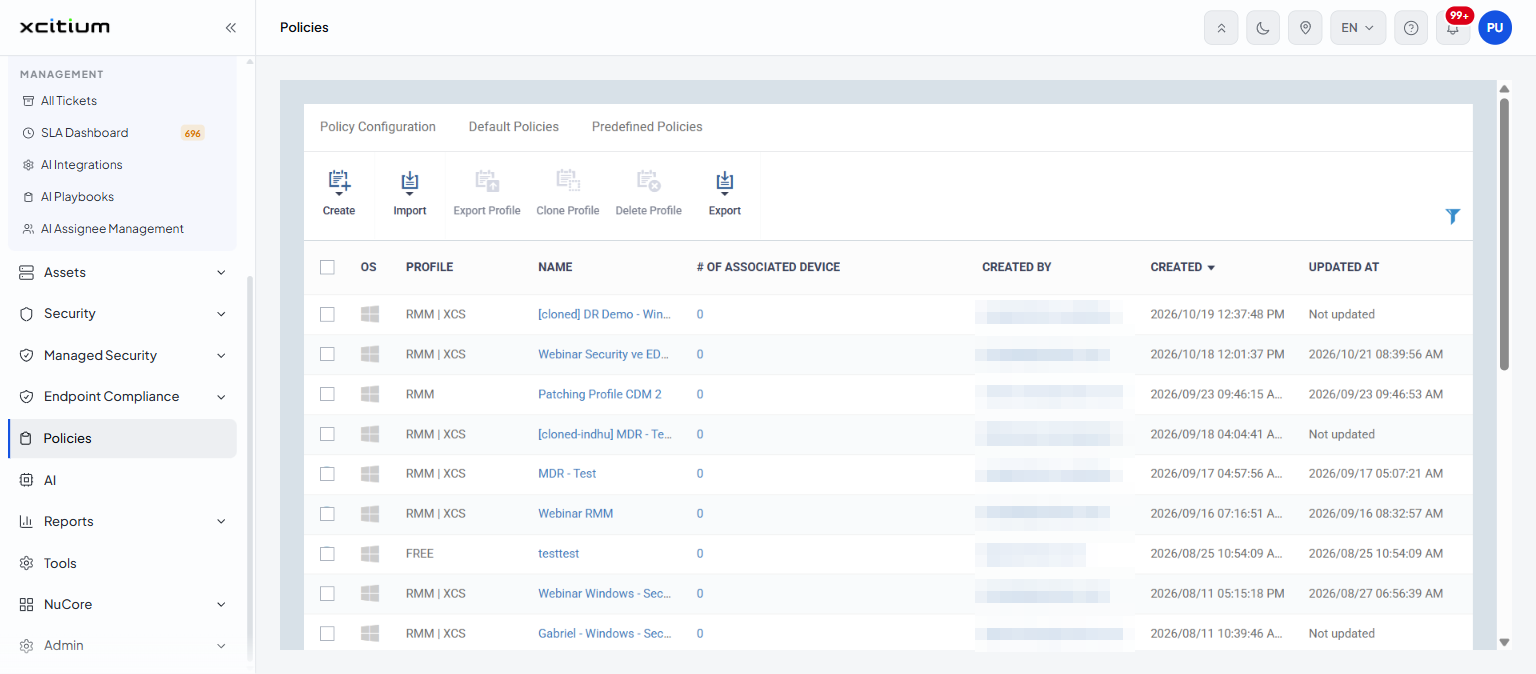
Toolbar
| Button | Description |
| Create | Opens a menu of six profile types. See Create a Profile. |
| Import | Opens a menu with two import routes. See Import a Profile. |
| Export Profile | Downloads the selected profile. Greyed out until a row is ticked; hovering it then reads 'Please select profile to take this action'. |
| Clone Profile | Makes a copy of the selected profile. Greyed out until a row is ticked. |
| Delete Profile | Removes the selected profile. Greyed out until a row is ticked. |
| Export | Opens a menu whose only entry is 'Export to CSV'. |
| Filter (funnel icon, far right) | Opens the filter panel. See Filter the Profile List. |
Columns
| Column | Description |
| Check box (first column) | Ticks the row so the 'Export Profile', 'Clone Profile' and 'Delete Profile' buttons become available. The check box in the header row ticks every row on the page. |
| OS | An icon for the operating system the profile is written for. Windows, macOS, Linux and Android icons appear in this list. Click the heading to sort by operating system. |
| Profile | The licence components the profile covers, shown as text: 'RMM', 'XCS', 'MDM', 'FREE', or a combination such as 'RMM | XCS'. This heading is not a sort link. |
| Name | The name of the profile, as a link. Click it to open the profile editor. Click the heading to sort by name. |
| # of associated device | How many devices the profile is attached to, as a link. Click the number to open the profile's 'Associated Devices' tab. Click the heading to sort. |
| Created by | The sign-in name of the user who created the profile, as a link to that user's record. Click the heading to sort. |
| Created | Date and time the profile was created, for example '2026/10/19 12:37:48 PM'. Click the heading to sort. The list arrives sorted on this column, newest first. |
| Updated at | Date and time the profile was last changed, or 'Not updated' if it has never been changed since creation. Click the heading to sort. |
Work with the profile list
- Click 'Policies' in the left navigation bar.
- Click a column heading to sort the list by that column. Click it again to reverse the order.
- Click the funnel icon on the right to narrow the list. See Filter the Profile List.
- Click a profile name to open it. See The Profile Editor.
- Change 'Results per page' or click a page number to move through the list.
Note: 'Export Profile', 'Clone Profile', 'Delete Profile' and 'Export to CSV' act as soon as you click them. There is no confirmation step. See Export, Clone and Delete Profiles.