


Agent Dashboard
- Click 'AI' > 'AI Agent' > 'Manage Your AI Agent' > 'Dashboard' to open this interface.
The 'Dashboard' tab is the first screen of an IT Service agent. It shows how many tickets the agent is handling, gives shortcuts to the tasks you do most, and lists the actions waiting for an approver.
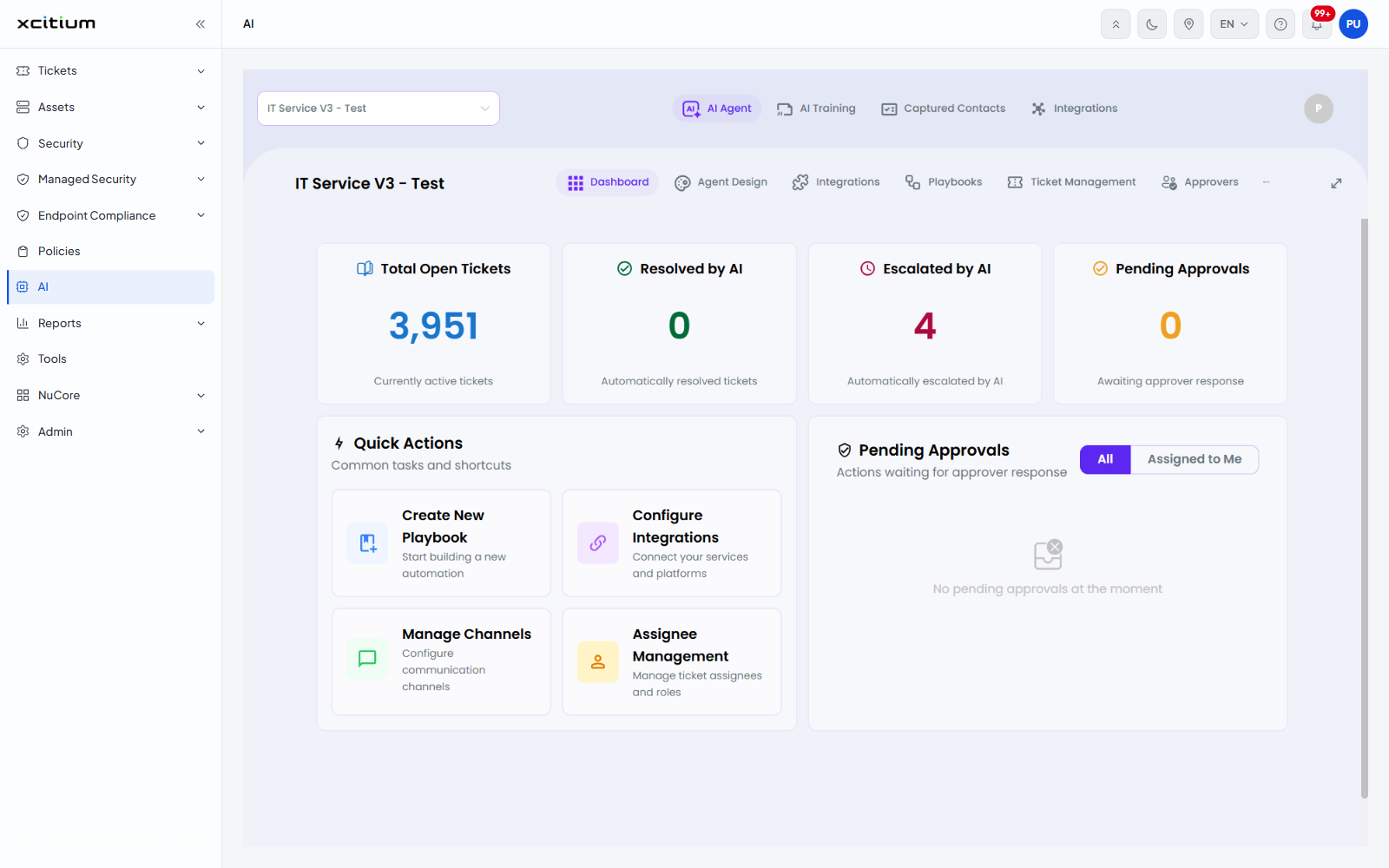
The figure cards
| Card | Description |
| Total Open Tickets | 'Currently active tickets'. |
| Resolved by AI | 'Automatically resolved tickets'. |
| Escalated by AI | 'Automatically escalated by AI'. |
| Pending Approvals | 'Awaiting approver response'. |
Quick Actions
'Common tasks and shortcuts'. Each tile opens the matching screen.
| Tile | Description |
| Create New Playbook | 'Start building a new automation'. |
| Configure Integrations | 'Connect your services and platforms'. |
| Manage Channels | 'Configure communication channels'. |
| Assignee Management | 'Manage ticket assignees and roles'. |
Pending Approvals
'Actions waiting for approver response'. Two buttons filter the list: 'All' (selected by default) and 'Assigned to Me'. When nothing is waiting the panel shows 'No pending approvals at the moment'.
See 'Approvers' for the people who can approve these actions, and 'Playbooks' for the automations that raise them.