


Cloud Alerts
- Click 'Security' > 'Cloud Security' > 'Alerts' to open this interface.
Cloud alerts come from the runtime agent in your clusters: a workload did something a policy forbids, and the agent said so. This screen is the live stream of those alerts, with the filters to cut it down and the controls to turn a filter into a standing trigger.
You can choose the alert source and state, filter by severity, set how often the list refreshes, change the period, search the messages, aggregate repeated alerts, save a filter, create a trigger from it, and export the result.
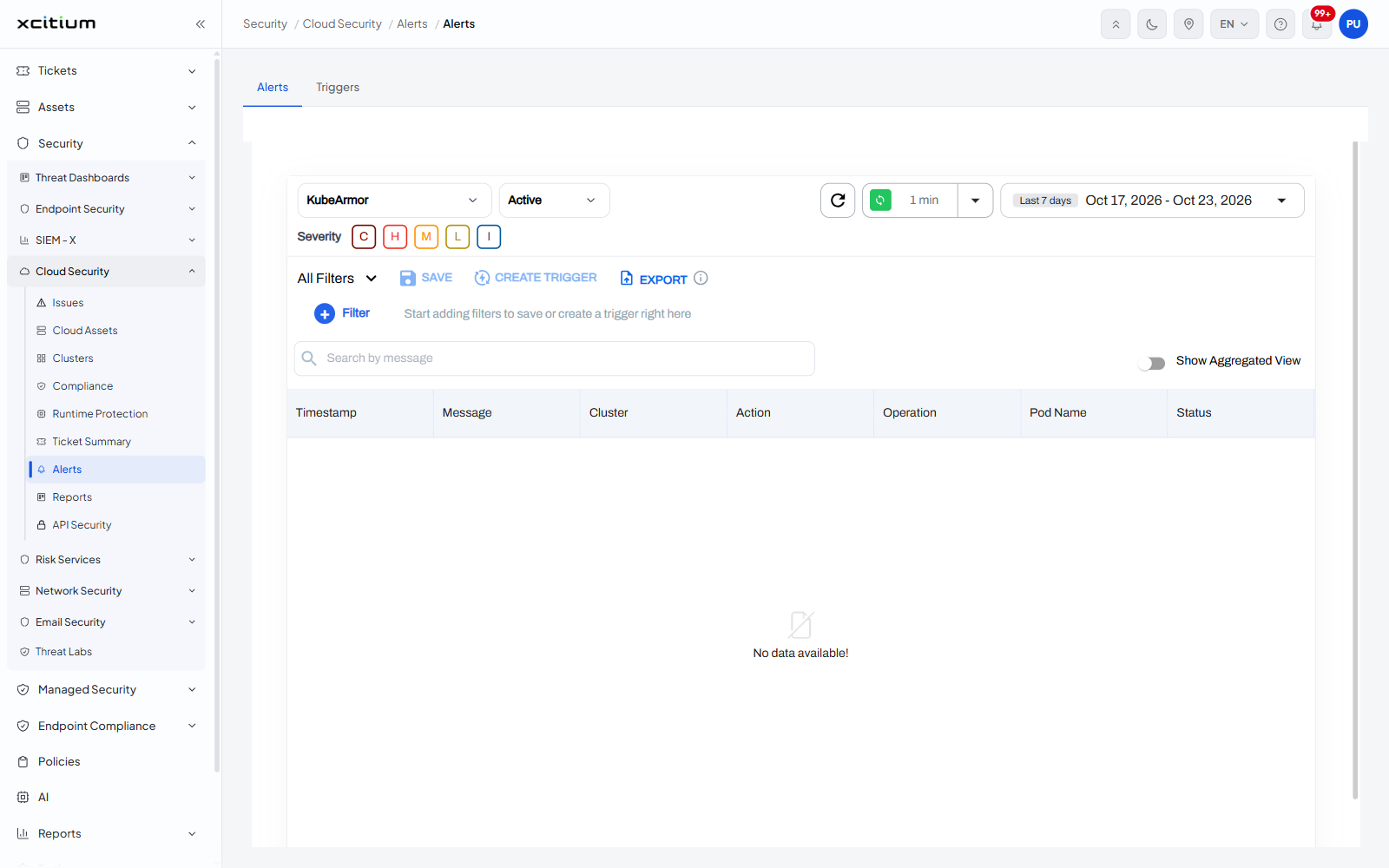
The interface
The screen has two tabs: 'Alerts', the stream it opens on, and 'Triggers'. See Alert Triggers for the second.
Controls above the list
| Control | Description |
| Source | A drop-down naming which agent the alerts come from, showing 'KubeArmor'. |
| State | A drop-down showing 'Active'. |
| Refresh | A circular-arrow icon that reloads the stream now. |
| Auto-refresh | A green control showing the interval, '1 min', with its own drop-down to change it. |
| Date range | A chip naming the period, 'Last 7 days', with the dates it resolves to. |
| Severity | Five letter buttons under the source drop-down - 'C', 'H', 'M', 'L' and 'I' - for critical, high, medium, low and informational. Each is coloured and can be switched on or off. |
| All Filters | A drop-down that holds the filter set in force. |
| SAVE | Saves the filter you have built. |
| CREATE TRIGGER | Turns the filter into a standing trigger on the 'Triggers' tab. |
| EXPORT | Exports the filtered alerts. An information icon sits beside it. |
| + Filter | Adds a filter condition. Until one is added the row reads 'Start adding filters to save or create a trigger right here'. |
| Search by message | A box that narrows the stream by the text of the alert. |
| Show Aggregated View | A switch at the right that collapses repeated alerts into one row each. |
Column descriptions
| Column | Description |
| Timestamp | When the alert was raised. |
| Message | What the agent reported. |
| Cluster | The cluster it came from. |
| Action | What the policy did about it. |
| Operation | The kind of operation that triggered it, for example a file or process action. |
| Pod Name | The pod the operation happened in. |
| Status | Where the alert stands. |
Build a filter and keep it
- Set the source and state drop-downs, and switch the severity letters you care about on.
- Click '+ Filter' and add the conditions you want.
- Click 'SAVE' to keep the filter, or 'CREATE TRIGGER' to have the console act on matching alerts from now on.