


Remote Tools
- Open a Windows profile, then click the 'Remote Tools' tab.
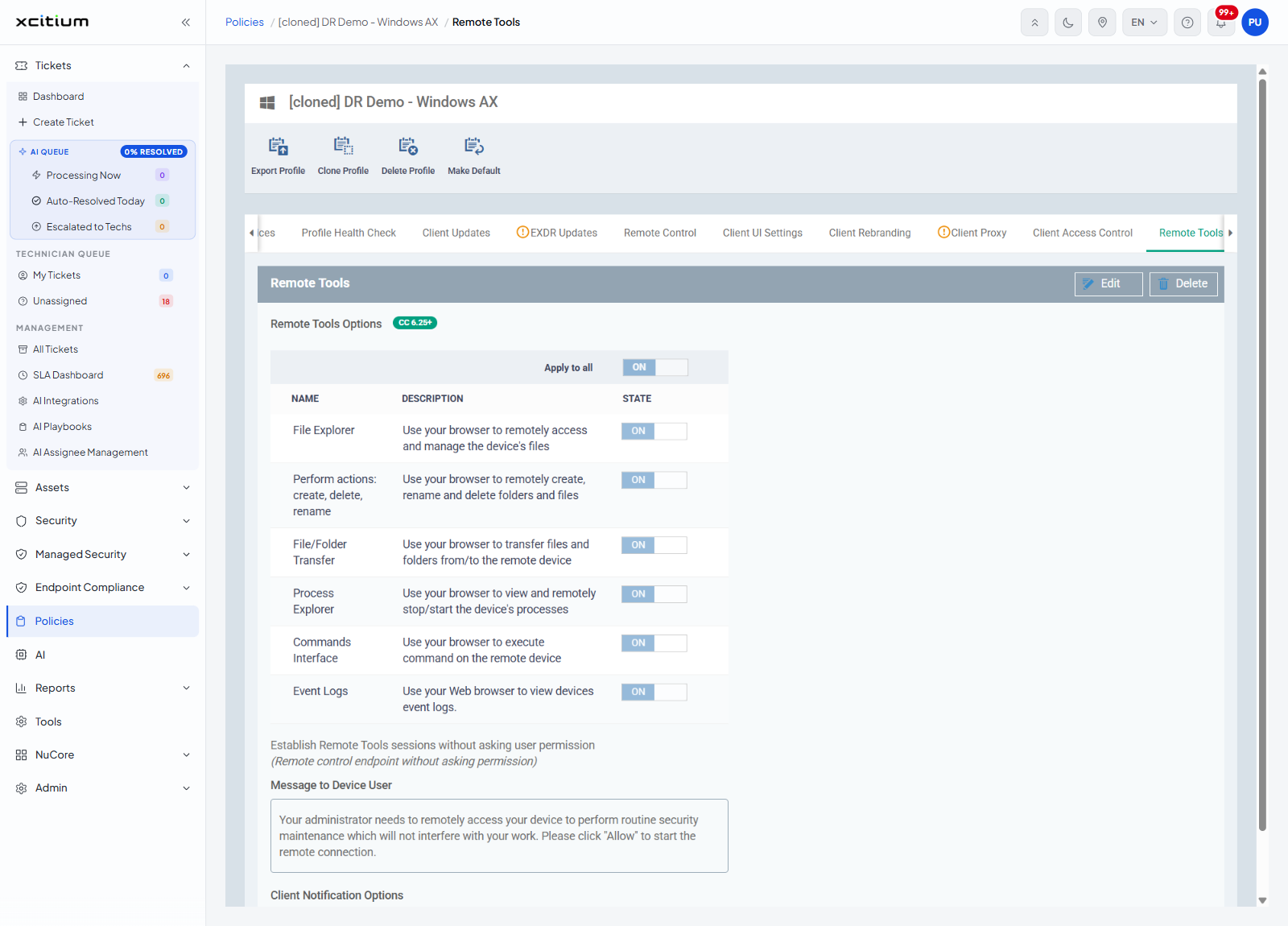
'Remote Tools' decides what a technician may do on the device from the browser, without taking the screen over. The group is headed 'Remote Tools Options' and carries the badge 'CC 6.25+'. The panel has 'Edit' and 'Delete' buttons.
Apply to all
An 'Apply to all' ON/OFF toggle above the table sets every row underneath at once.
The tools
| NAME | DESCRIPTION | STATE |
| File Explorer | Use your browser to remotely access and manage the device's files | ON / OFF |
| Perform actions: create, delete, rename | Use your browser to remotely create, rename and delete folders and files | ON / OFF |
| File/Folder Transfer | Use your browser to transfer files and folders from/to the remote device | ON / OFF |
| Process Explorer | Use your browser to view and remotely stop/start the device's processes | ON / OFF |
| Commands Interface | Use your browser to execute command on the remote device | ON / OFF |
| Event Logs | Use your Web browser to view devices event logs. | ON / OFF |
Other settings
| Setting | Description |
| Establish Remote Tools sessions without asking user permission | Starts the session without prompting the person at the device. The line underneath reads '(Remote control endpoint without asking permission)'. |
| Message to Device User | A text box holding the prompt the device user sees. Its text read 'Your administrator needs to remotely access your device to perform routine security maintenance which will not interfere with your work. Please click "Allow" to start the remote connection.' |
| Show notification to device user about who connected to his/her workstation | Under the heading 'Client Notification Options'. |
Decide what the browser tools may do
- Click 'Policies' in the left navigation bar and open the profile.
- Click the 'Remote Tools' tab, then 'Edit'.
- Switch each tool on or off, or use 'Apply to all'.
- Decide whether the device user is asked first, and what the prompt says.
- Click 'Save'.
Note: 'Perform actions: create, delete, rename' and 'File/Folder Transfer' extend 'File Explorer'. Turning 'File Explorer' off leaves the technician no file access at all.
Note: taking the screen over is controlled separately. See Remote Control.