Comodo Help
Find the desired product help
Xcitium MSP

Xcitium MSP

Xcitium MSP Administrator Guide

English

Print Help
Tickets > Management > All Tickets > Ticket Detail > Resolve, Close And Reopen A Ticket
  • Introduction
    • Key Concepts
    • Best Practices
    • Log In To The Console
      • Reset Your Password
    • The Admin Console
    • The Dashboard
  • Tickets
    • Dashboard
    • Create Ticket
    • AI Queue
      • Processing Now
      • Auto-Resolved Today
      • Escalated To Technicians
    • Technician Queue
      • My Tickets
      • Unassigned Tickets
      • Assign A Ticket From The Unassigned Queue
    • Management
      • All Tickets
        • Ticket Detail
          • Edit A Ticket
          • Reply To A Ticket Or Add An Internal Note
          • View The Activity Log
          • Reassign A Ticket
          • Change Ticket Priority
          • Manage Ticket Attachments
          • Resolve, Close And Reopen A Ticket
          • Merge Tickets
          • AI Insights On A Ticket
          • SLA Status On A Ticket
      • SLA Dashboard
      • AI Integrations
      • AI Playbooks
        • Create A Playbook
        • Playbook Approvers
        • Playbook Tools
      • AI Assignee Management
        • Add An Assignee
        • Add A New User
  • Assets
    • All Devices
      • Device List
        • Filter The Device List
        • Group Management
          • Create A Device Group
        • Enroll A Device
          • Set The Enrollment Options
          • Send The Enrollment Link
          • Enrollment Reference Pages
        • Device Details
          • View And Edit The Device Name
          • View Device Summary Information
          • View Network Information
          • View Policies Associated With A Device
            • Review Profile Suggestions
          • View Applications Installed On A Device
          • View The Command Queue
          • View MSI Installation State
          • View And Manage Patches On A Device
          • View A Device's Groups
          • View Device Logs
          • Manage A Device's Policies
          • Run A Procedure On A Device
          • Install And Manage Packages On A Device
          • Reboot Or Shut Down A Device
          • Collect Performance Logs
          • Change A Device's Owner
          • Delete A Device
      • Bulk Installation Package
        • Customize A Bulk Package
        • Download Remote Control
    • Monitor Health
      • Customize The Monitor Health Cards
    • Monitoring And Management
      • Alerts
        • Create An Alert
        • Configure Alert Settings
        • Set Alert Recipients
      • Procedures
        • Manage Procedure Folders
        • Filter The Procedures List
        • Create A Procedure
        • A Procedure's General Tab
        • View And Edit A Procedure's Script
        • A Procedure's Schedule Tab
        • A Procedure's Execution Log
          • View Execution Details Of A Run
        • A Procedure's Parameters Tab
        • Run A Procedure
        • Clone, Export And Delete Procedures
      • Monitors
        • Filter The Monitors List
        • Create A Monitor
        • A Monitor's General Tab
        • A Monitor's Conditions Tab
          • Add A Performance Condition
          • Add A File Size Condition
          • Add A Folder Size Condition
          • Add A Disk Condition
          • Add A Service Condition
          • Add A Process Condition
          • Add An Event Condition
          • Add A TCP Condition
          • Add A Ping Condition
          • Add A Web Page Condition
          • Add A Device Status Condition
          • Add A Custom Script Condition
          • Add A Security Events Condition
          • Add A Security Client Events Condition
          • Add An OS Patches Event Condition
        • A Monitor's Policies Tab
        • A Monitor's Logs Tab
        • Clone, Import, Export And Delete Monitors
      • Maintenance Windows
        • Add A Maintenance Window
        • Maintenance Window Settings
        • View A Maintenance Window
        • Filter The Maintenance Windows List
    • Network Management
      • Discoveries
        • Filter The Discoveries List
        • Create A Discovery
        • A Discovery's General Tab
        • Discovery Auto Enrollment
        • Discovery Notifications
        • Schedule A Discovery
        • Discovery Logs
        • Clone And Delete Discoveries
      • Network Profiles
        • A Network Profile's Tabs
      • Network Devices
        • Filter The Network Devices List
      • Network Monitors
        • A Network Monitor's Tabs
        • A Network Monitor's Conditions Tab
          • Add A Network Uptime Condition
          • Add A Network Performance Condition
          • Add A Network Disk Condition
          • Add A Network Device Status Condition
          • Add An OID Condition
      • Blueprints
        • A Blueprint's Tabs
          • Add A Blueprint Condition
    • Applications
      • Desktop Application Control
        • Filter The Software Inventory
        • An Application's Pages
        • Create A File Group Variable
        • The Windows Application Store
      • Mobile Application Control
      • Patch Management
        • Filter The Patch List
        • A Patch's Info Pages
        • Create A Windows Patch Procedure
        • Third Party Application Patches
    • Endpoint Intelligence
      • The Endpoint Intelligence Dashboard
      • Device Queries
        • The Schema Reference
      • The Query Library
      • Endpoint Intelligence Monitors
        • Create An Endpoint Intelligence Monitor
  • Security
    • Threat Dashboards
      • Endpoint Threat Dashboard
      • Cloud Threat Dashboard
        • Add A Cloud Account
        • Add A Cluster, Registry Or Code Repository
      • Endpoint Compliance Dashboard
        • Choose The Endpoint Compliance Widgets
      • CTEM Dashboard
      • CTEM Metrics
      • Xcitium Verdict Cloud Dashboard
        • Choose The Xcitium Verdict Cloud Widgets
    • Endpoint Security
      • Alerts
        • Alert Search
          • Alert Search Filters
          • The Alert List
          • Alert Detail
            • Alert Detail For An EDR Alert
            • Alert Detail For A MITRE-Mapped Alert
        • Hash View
          • File Details
        • Device View
          • Device Detail
        • Alert Policy
          • Alert Policy Detail
            • The Condition Editor
          • Create An Alert Policy
        • Suppression Rules
          • Add A Suppression Rule
            • Query Builder Help
      • EXDR
        • Event Search
        • Choose Aggregation Fields And Result Columns
        • Hash Search
        • Device Search
        • Android Threat History
        • Event View
        • File View
        • Device View
      • Security Status
        • Antivirus Scan History
      • Blocked Threats
      • Quarantined Threats
      • Contained Threats
        • Contained File Details
      • EDR Events
      • Firewall Events
      • Autorun Alerts
      • File Rating
        • Detected Scripts
        • Obsolete Files
      • File Verdicts
      • Device Control
      • DLP Configuration
        • Create A Discovery Rule
        • Create A Monitoring Rule
      • DLP Events
        • DLP Logs
        • DLP Quarantined Files
      • Vulnerability Management
        • Vulnerable Devices
    • SIEM - X
      • Event Collection Summary
      • Event Query
      • Long Term Analysis
      • Report Generation
      • Token Management
        • Network Settings
        • User Settings
        • Sensor Settings
    • Cloud Security
      • Issues
        • Findings Summary
        • Rule Engine
        • Registry Scan
      • Cloud Assets
      • Clusters
      • Compliance
        • Compliance Detailed View
      • Runtime Protection
        • Runtime Policies
      • Ticket Summary
      • Cloud Alerts
        • Alert Triggers
      • Cloud Reports
      • API Security
        • API Specification
        • API Scan
    • Network Security
    • Email Security
      • Email Protection
    • Threat Labs
  • Managed Security
    • Service
      • Alerts, Incidents And Website Vulnerabilities
      • Customer Health
      • Add A New Customer
      • Import Customers
    • Customer Summary
    • Service Summary
    • Incidents
    • Log Collection Summary
    • Reporting
    • Tickets
      • Create A New Ticket
  • Endpoint Compliance
    • Work With Endpoint Compliance Lists
    • Agents
      • LightWeight Agents
      • Probe Agents
      • Deprecated Agents
      • Download And Install An Agent
    • All Assets
      • All Assets - Table View
      • View Asset Details
      • Asset Inventory Tabs
      • Asset Problems, Solutions And Compliance
    • Other Assets
    • Deprecated Assets
    • Problems
    • Solutions
    • Pending OS Patches
    • Ports
    • Patch Management
    • Application Baseline Results
    • Certificates
    • Vulnerabilities
    • Application Vulnerabilities
    • Vulnerability By OS
    • OS Vulnerabilities
    • Network Scan Findings
    • Compliance Standards
    • Compliance Assessment
    • Compliance Check Master
    • Discovery Settings And Credentials
    • Manage Mapping
    • Jobs
    • Alerts
  • Policies
    • The Profile List
      • Create A Profile
      • Import A Profile
      • Export, Clone And Delete Profiles
      • Filter The Profile List
    • Policy Configuration
      • Create A Policy
      • Import A Policy
      • Export And Delete Policies
    • Default Policies
    • Predefined Policies
    • The Policy Editor
      • Policy General Settings
      • Policy Associated Devices
      • Add And Remove Policy Sections
      • Policy Antivirus Settings (Linux)
      • Policy Sections By Operating System
    • The Profile Editor
      • Sections Configuration
      • Add And Remove Profile Sections
      • Profile Sections On Other Operating Systems
      • General (Windows Profile)
      • Associated Devices (Windows Profile)
      • Profile Health Check
      • Client Updates
      • EXDR Updates
      • Remote Control
      • Client UI Settings
      • Client Rebranding
      • Client Proxy
      • Client Access Control
      • Remote Tools
      • Monitors
      • Procedures
      • Patch Management
      • Maintenance Window
      • Global Proxy
      • Client Logging Settings
      • Antivirus
      • Firewall
      • EDR
      • File Rating
      • Containment
      • VirusScope
      • Xcitium Verdict Cloud
      • Agent Discovering Settings
      • External Devices Control
      • Miscellaneous
      • Script Analysis
      • Data Loss Prevention
      • XCS Access Control
      • XCS Proxy
      • XCS Updates
      • XCS UI Settings
      • XCS Logging Settings
      • Performance
      • Applications
      • Chat
      • Thumbnails
  • AI
    • Manage Your AI Agents
      • AI Agent Card Actions
    • Switch Between AI Agents
    • Account Settings
    • Add A New AI Agent
      • Add An AI Agent From The Marketplace
    • Request A Managed AI
    • Manage An AI Agent
      • Agent Dashboard
      • Agent Design
        • Embed The Agent On Your Website
      • Agent Integrations
      • Playbooks
      • Ticket Management
        • Assignee Management
      • Approvers
      • Channels
      • Chat History
      • Agent Repository
      • Try Agent
      • Chat Agent Dashboard
      • Question And Answer
      • AI Cache
      • Candidates
      • Interview Questions
      • Keyword Search
    • AI Training
      • Manage A Training Repository
    • Captured Contacts
      • Custom Contact Fields
      • Email Notification Settings
    • Integrations
      • Webhook Request
  • Customers
    • Add A Customer
    • Edit A Customer
    • Delete A Customer
  • Reports
    • Standard Reports
      • On-Demand Reports
      • Scheduled Reports
      • Create A New Report
      • Edit A Scheduled Report
    • Custom Reports
      • The Report Catalogue
      • Configure And Generate A Custom Report
      • Generated Reports
        • View Generated Report Details
      • Advanced Reports
        • The Advanced Reports Screen
        • Quick Start: Your First Advanced Report
        • Pick The Data For A Report
        • Filter Rows
        • Count And Group Results
        • Change The Chart Or Table
        • Build A Multi-Step Report
          • Sort And Limit Rows
          • Add A Custom Column
          • Combine Two Tables (Join)
        • Save, Open And Manage Reports
        • Download Results And View The SQL
        • Toolbar And Bottom Bar Reference
        • Troubleshooting And Limits
      • Reports Beta
        • Reports Beta: Scheduled Reports
        • Reports Beta: Create A Report
    • SLA Reports
    • Audit Logs
      • Filter The Audit Log
  • Tools
    • The Tool Card And Its Controls
    • Download And Use A Tool
    • Xcitium Cleaning Essentials
    • Threat Hunter Assessment Tool
    • Auto Discovery And Deployment Tool
    • Xcitium Remote Control
    • ITarian Remote Access
    • Agent Removal Tool
  • NuCore
  • Admin
    • Staff
      • Add A Staff Member
      • Edit A Staff Member
    • Users
      • User List
        • View A User
        • Create A User
        • Import Users
      • User Groups
      • Role Management
        • Role Permissions And Scope
    • Integrations
      • Office 365
      • AWS
      • SentinelOne
      • Windows Defender
      • Microsoft Entra
      • Google Workspace
      • CrowdStrike
      • Azure Active Directory
    • Licenses
      • License Details
      • Bill Forecast
      • License Allocations
    • Account
      • Your Account
      • Remote Access Support
    • Settings
      • Ticketing Settings
      • System Templates
      • Portal Setup
      • Dashboard Settings
      • CTEM
      • Data Protection Templates
      • Android EMM
      • Apple Business Manager
      • Support

Resolve, Close and Reopen a Ticket


Open a ticket and use the 'Actions' card on the right of the page, or the 'Close Ticket' button on the ticket toolbar.

These are the one-click status changes. Resolving marks the work as done; closing ends the ticket; reopening puts a resolved or closed ticket back into play. Each is applied immediately — there is no confirmation step — and each is recorded in the activity trail.

You can resolve a ticket, close it, and reopen it again from the same card.

The actions

Action Where Effect
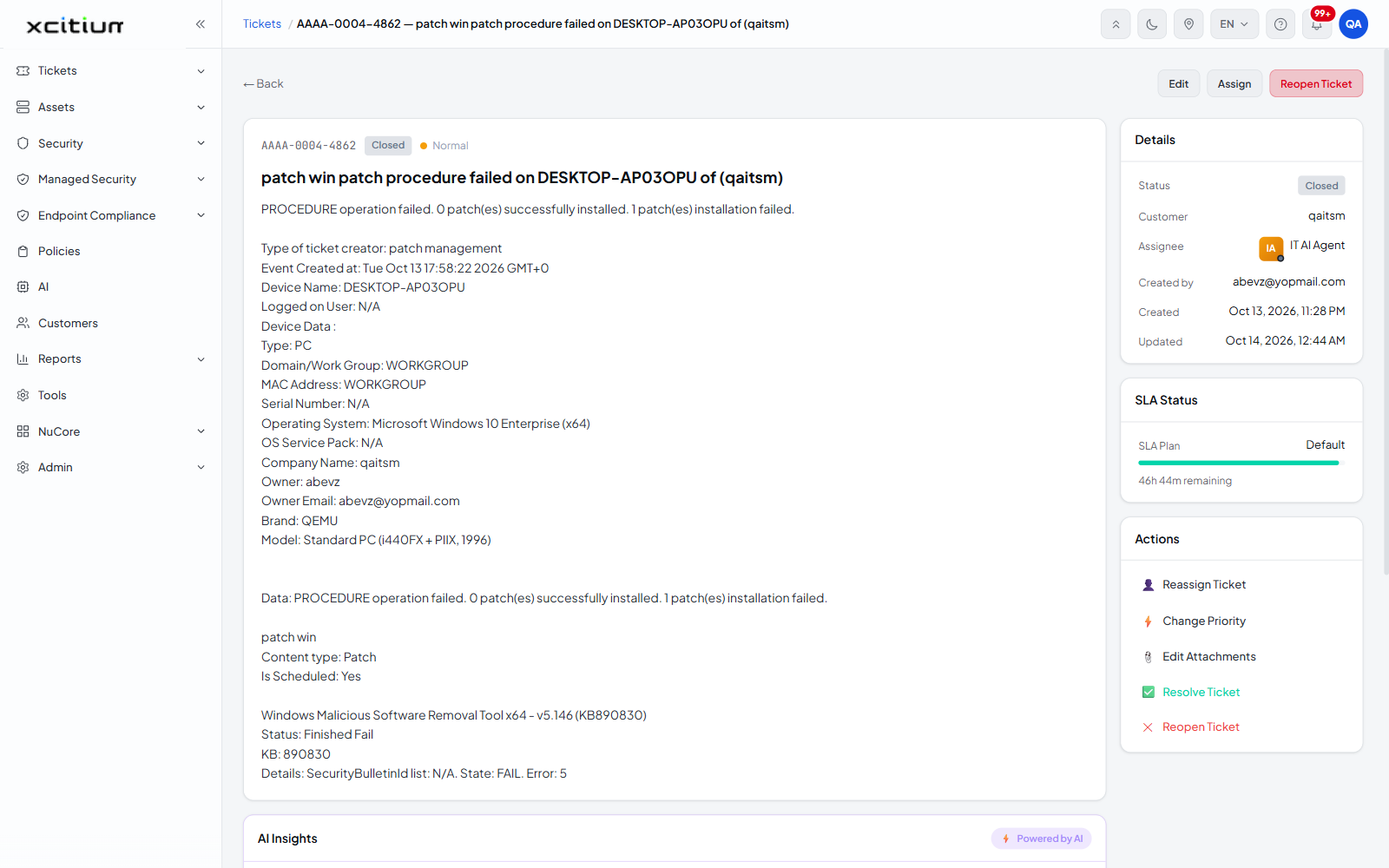
✅ Resolve Ticket 'Actions' card Sets the ticket status to 'Resolved'. The action then reads '✅ Reopen Ticket'.
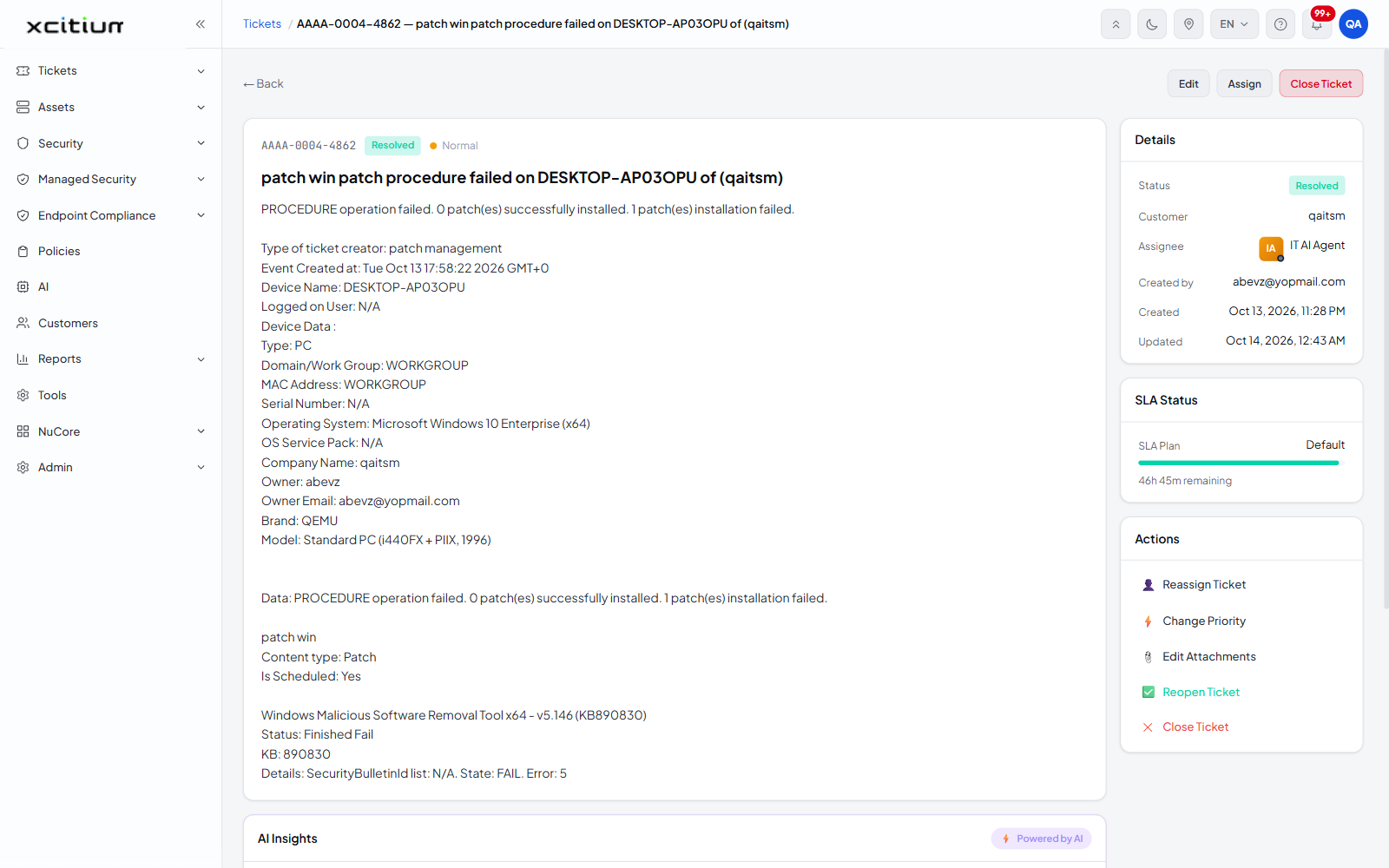
✕ Close Ticket 'Actions' card and the ticket toolbar Sets the ticket status to 'Closed'. The action in the card then reads '✕ Reopen Ticket'.
Reopen Ticket 'Actions' card Sets a resolved or closed ticket back to 'Open'. The action reverts to 'Resolve Ticket' or 'Close Ticket'.

Resolve a ticket

  1. Open the ticket from any ticket list.

  2. In the 'Actions' card, click '✅ Resolve Ticket'.

  3. The status pill beside the ticket number and the 'Status' row in the 'Details' card both change to 'Resolved'.
Xcitium_MSP_1.png

Close a ticket

  1. Open the ticket from any ticket list.

  2. Click 'Close Ticket' on the ticket toolbar, or '✕ Close Ticket' in the 'Actions' card.

  3. The status changes to 'Closed'.

Xcitium_MSP_2.png

Reopen a ticket

  1. Open the resolved or closed ticket.

  2. In the 'Actions' card, click 'Reopen Ticket'.

  3. The status returns to 'Open'.

Note: these actions take effect as soon as you click them, with no confirmation dialog. Each one writes an entry to the activity trail — for example 'Ticket has been Resolved by System' — so the change is always traceable.


For the other states — 'Archived', 'Deleted', 'Unverified', 'Request Approval' and 'Reject' — use the 'Status' dropdown on the Edit a Ticket screen.


Our Products
  • Free Antivirus
  • Free Internet Security
  • Website Malware Removal
  • Free Anti-Malware
  • Anti-Spam (Free Trial)
  • Windows Antivirus
  • Antivirus for Windows 7
  • Antivirus for Windows 8
  • Antivirus for Windows 10
  • Antivirus for MAC
  • Antivirus for Linux
  • Free Endpoint Security
  • Free ModSecurity
  • Free RMM
  • Free Website Malware Scanner
  • Free Device Manager for Android
  • Free Demo
  • Network Security
  • Endpoint Protection
  • Antivirus for Android
  • Comodo Antivirus
  • Wordpress Security
Cheap CDN
  • Bootstrap CDN
  • Semantic UI CDN
  • Jquery CDN
  • CDN Plans
  • CDN
  • Free CDN
Enterprise
  • Patch Management Software
  • Patch Manager
  • Service Desk
  • Website Down
  • Endpoint Protection Solutions
  • Website Security Check
  • Remote Monitoring and Management
  • Website Security
  • Device Manager
  • ITSM
  • CRM
  • MSP
  • Android Device Manager
  • MDR Services
  • Managed IT Support Services
  • Free EDR
Free SSL Certificate
Support Partners Terms and Conditions Privacy Policy

© Comodo Group, Inc. 2026. All rights reserved.