


Miscellaneous
- Open a Windows profile, then click the 'Miscellaneous' tab.
'Miscellaneous' collects the security client's remaining protections: shellcode detection, autorun handling, early start-up monitoring, DLL control and the client's own self-protection. The panel carries 'Edit' and 'Delete' buttons.
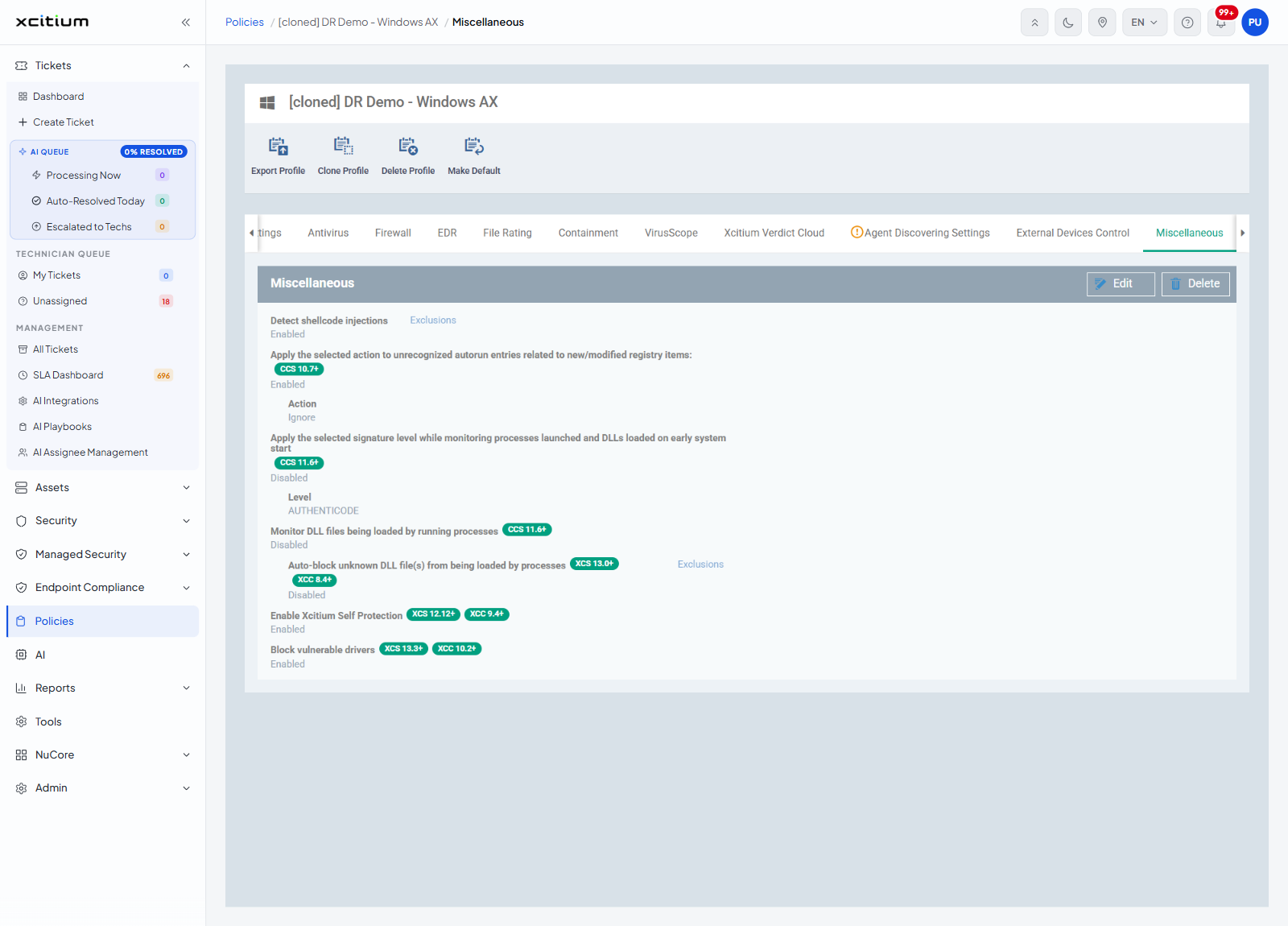
Settings
| Setting | Badge | Value seen | Extra control |
| Detect shellcode injections | — | Enabled | An 'Exclusions' link. |
| Apply the selected action to unrecognized autorun entries related to new/modified registry items: | CCS 10.7+ | Enabled | An 'Action' setting, for example 'Ignore'. |
| Apply the selected signature level while monitoring processes launched and DLLs loaded on early system start | CCS 11.6+ | Disabled | A 'Level' setting, for example 'AUTHENTICODE'. |
| Monitor DLL files being loaded by running processes | CCS 11.6+ | Disabled | — |
| Auto-block unknown DLL file(s) from being loaded by processes | XCS 13.0+, XCC 8.4+ | Disabled | An 'Exclusions' link. |
| Enable Xcitium Self Protection | XCS 12.12+, XCC 9.4+ | Enabled | — |
| Block vulnerable drivers | XCS 13.3+, XCC 10.2+ | Enabled | — |
Add an exclusion to a setting
The 'Exclusions' links on this section open the 'Exclusions' dialog. Each link keeps its own list, so an exclusion added under one setting does not apply to the other. The links are greyed out until you click 'Edit', and the link beside the DLL option also stays greyed out until that option is switched on.
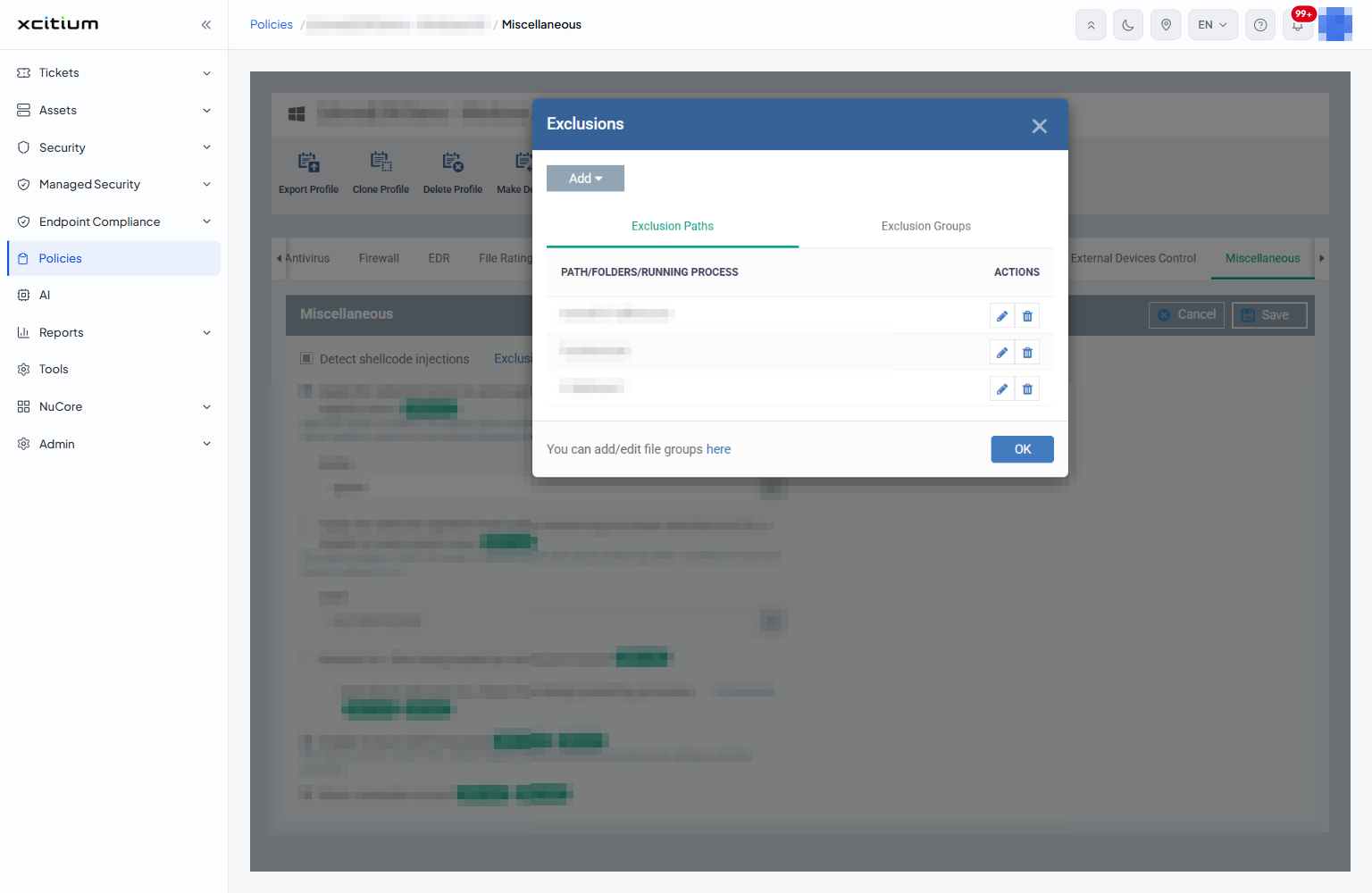
| Control | Description |
| Exclusion Paths | A tab listing individual entries, under the columns 'PATH/FOLDERS/RUNNING PROCESS' and 'ACTIONS'. |
| Exclusion Groups | A tab listing whole file groups. The line beside it reads 'You can add/edit file groups here', where 'here' is a link to the file group editor. |
| Add | Adds a row to whichever tab is open. |
- Click 'Policies' in the left navigation bar and open the profile.
- Click the 'Miscellaneous' tab, then click 'Edit'.
- Click the 'Exclusions' link beside the setting you want to narrow.
- Click 'Exclusion Paths' or 'Exclusion Groups', then click 'Add' and give the entry.
- Click 'OK', then click 'Save'.
Change the miscellaneous protections
- Click 'Policies' in the left navigation bar and open the profile.
- Click the 'Miscellaneous' tab.
- Click 'Edit'.
- Turn the protections on or off and set the 'Action' and 'Level' values.
- Use the 'Exclusions' links to list anything that should be left alone.
- Click 'Save'.
Note: the badges beside a setting name the client versions it applies to. A setting badged 'XCS 13.3+' has no effect on an older security client.