


Compliance Check Master
- Click 'Endpoint Compliance' > 'Compliance Check Master' to open this interface.
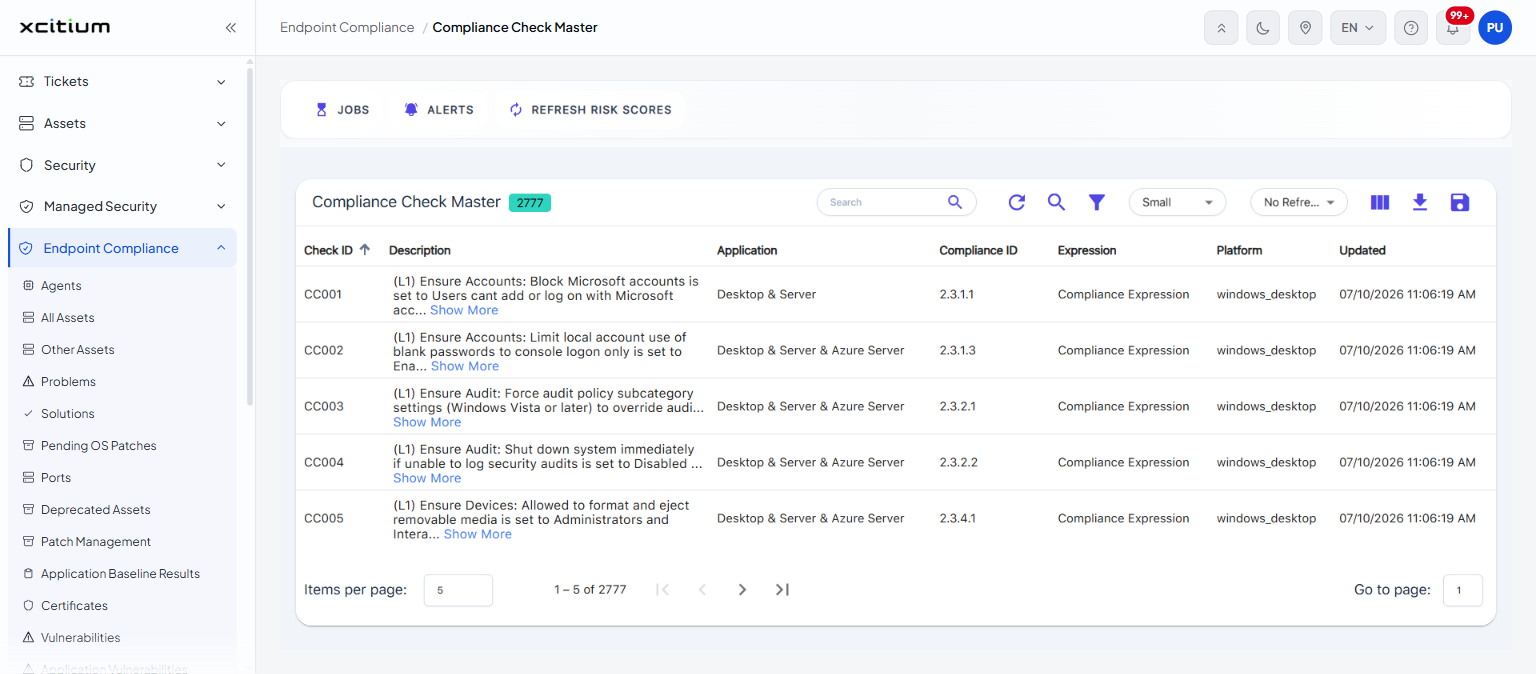
The 'Compliance Check Master' page is the catalogue of every individual check the service can run, whichever standard it belongs to. Use it to look up what a particular check tests and which compliance requirement it maps to.
You can search, filter, choose columns and export the catalogue from this interface.
Columns
The list is headed 'Compliance Check Master' with a chip showing how many checks it holds.
| Column | Description |
| Check ID | The service's own identifier for the check, for example 'CC001'. |
| Description | What the check tests, with a 'Show More' link where it is long. |
| Application | What the check applies to, for example 'Desktop & Server'. |
| Compliance ID | The numbered requirement in the standard that the check maps to. |
| Expression | The expression the check evaluates. |
| Platform | The platform the check runs on, for example 'windows_desktop'. |
| Updated | When the check was last changed. |
Filter this list
The 'Filter Table Data' builder offers these fields on this page: 'Application', 'Check ID', 'Compliance ID', 'Description', 'Expression', 'Platform' and 'Updated'. See 'Work with Endpoint Compliance Lists'.
Look up a check
- Click 'Endpoint Compliance' > 'Compliance Check Master'.
- Type part of the description, or a check number, in the 'Search' box.
- Click 'Show More' on a row to read the full description.
Note: this catalogue is read-only. It has no row menu.