


Probe Agents
- Click 'Endpoint Compliance' > 'Agents' > 'Probe Agents' to open this interface.
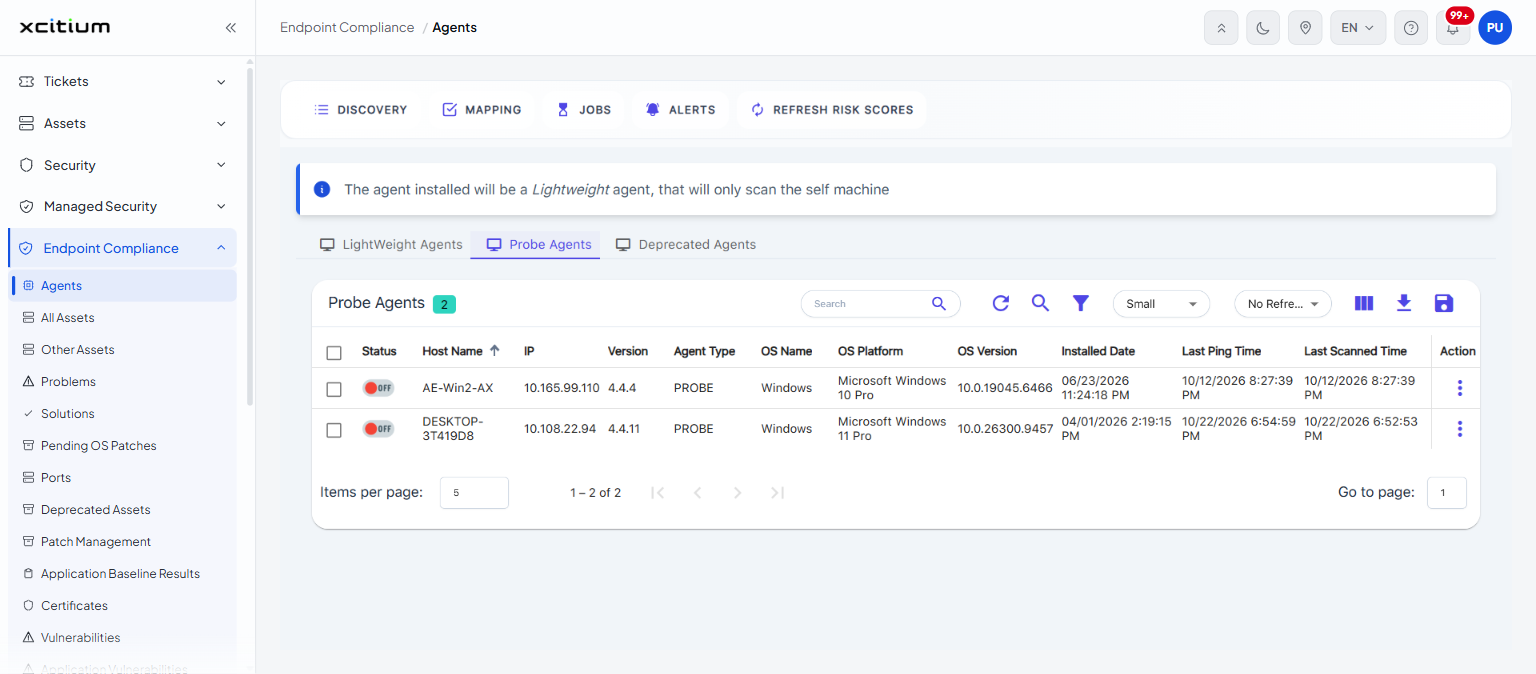
This tab lists the agents that act as a probe. The card heading reads 'Probe Agents' with a chip showing how many there are.
You can review each probe agent's status, address, version and scan times, and run the same maintenance actions as on the 'LightWeight Agents' tab.
Columns
| Column | Description |
| (check box) | Selects the row. The check box in the heading selects every row on the page. |
| Status | Whether the agent is reachable. A green 'ON' pill means 'Online'; a red 'OFF' pill means 'Offline'. |
| Host Name | The name of the machine the agent is installed on. |
| IP | The IP address of that machine. |
| Version | The version of the agent software. |
| Agent Type | The kind of agent. Agents on this tab show 'PROBE'. |
| OS Name | The operating system family of the machine. |
| OS Platform | The full operating system edition. |
| OS Version | The operating system build number. |
| Installed Date | The date and time the agent was installed. |
| Last Ping Time | The date and time the agent last contacted the console. |
| Last Scanned Time | The date and time the agent last completed a scan. |
| Action | Opens the row menu. |
Note: this tab has no 'Agent' download button. Download an installer from the 'LightWeight Agents' tab. See 'Download and Install an Agent'.