


Add a Security Client Events Condition
- Click 'Assets' > 'Monitoring & Management' > 'Monitors', open a monitor, click 'Edit', open the 'Conditions' tab, then click 'Add Condition' > 'Security Client Events'.
The condition watches the health of the security client itself rather than the threats it finds. The entry is badged 'CCS 10.6+'.
You can be told when the client cannot talk to the console, when its virus database goes stale, when a scan fails, or when another antivirus product appears on the device.
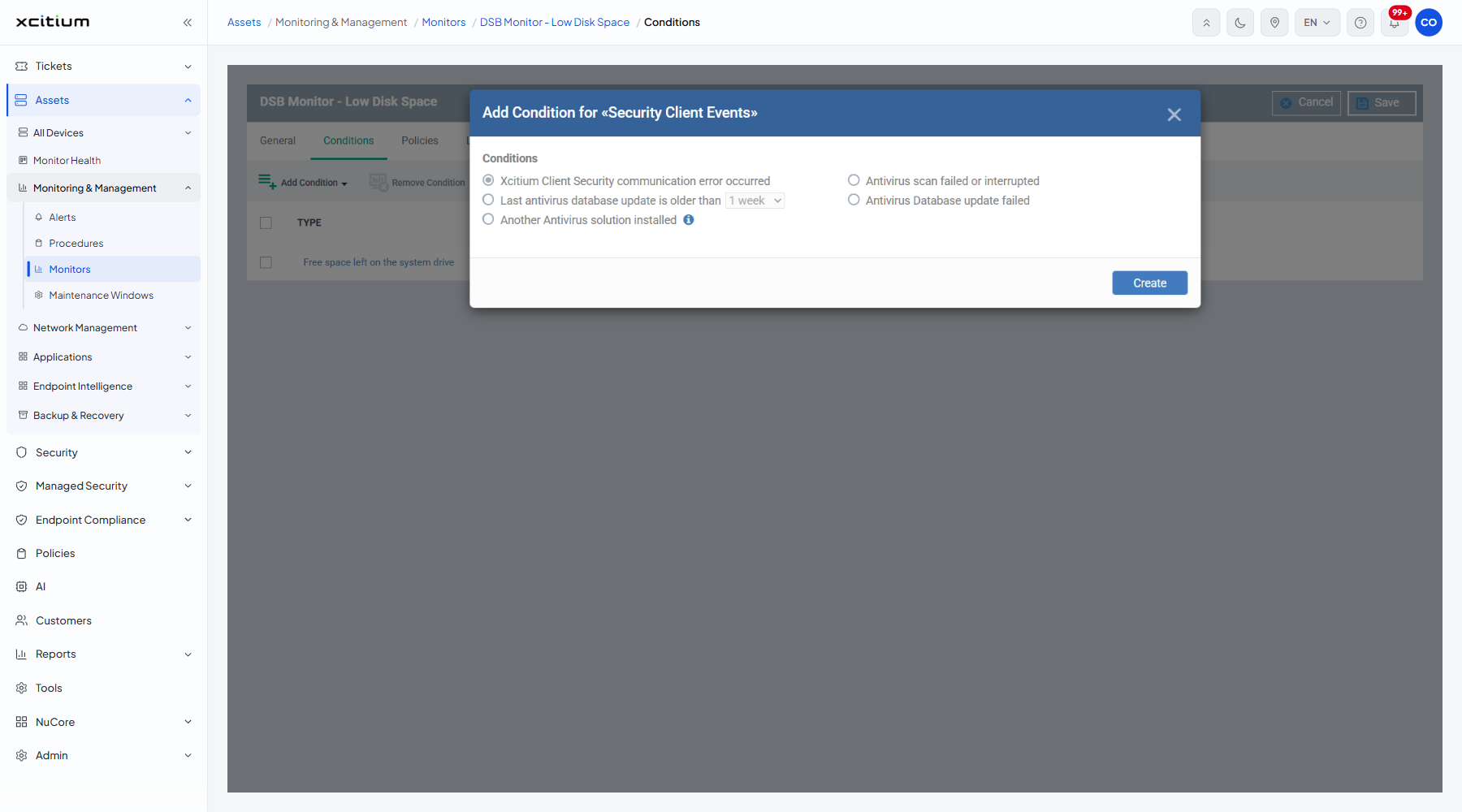
The fields
| Field | Type | Options / default | Required |
| Conditions | Radio group | 'Client Security communication error occurred' (default), 'Last antivirus database update is older than', 'Another Antivirus solution installed', 'Antivirus scan failed or interrupted', 'Antivirus Database update failed'. | Yes |
| (age dropdown) | Dropdown | Belongs to 'Last antivirus database update is older than'. Offers '1 day', '3 days', '1 week' (selected), '2 weeks', '1 month'. | No |
Add the condition
- Choose the event you want to watch.
- If you chose the database-age event, pick the age from the dropdown beside it.
- Click 'Create'.
- Click 'Save' on the monitor header to store the change.
Note: 'Another Antivirus solution installed' is the condition that catches the commonest cause of a protection gap, where a second product disables the managed one.