


Reports Beta: Create a Report
- Click 'Reports' > 'Custom Reports' > 'Standard' > 'Generated Reports' > 'Reports Beta' > 'Create Report' to open this interface.
The 'Create Report' tab builds a report in the beta console. Unlike the catalogue on the 'Standard' tab, which filters by customer and device, this form selects whole device groups and lets you choose between a finished PDF and a raw spreadsheet.
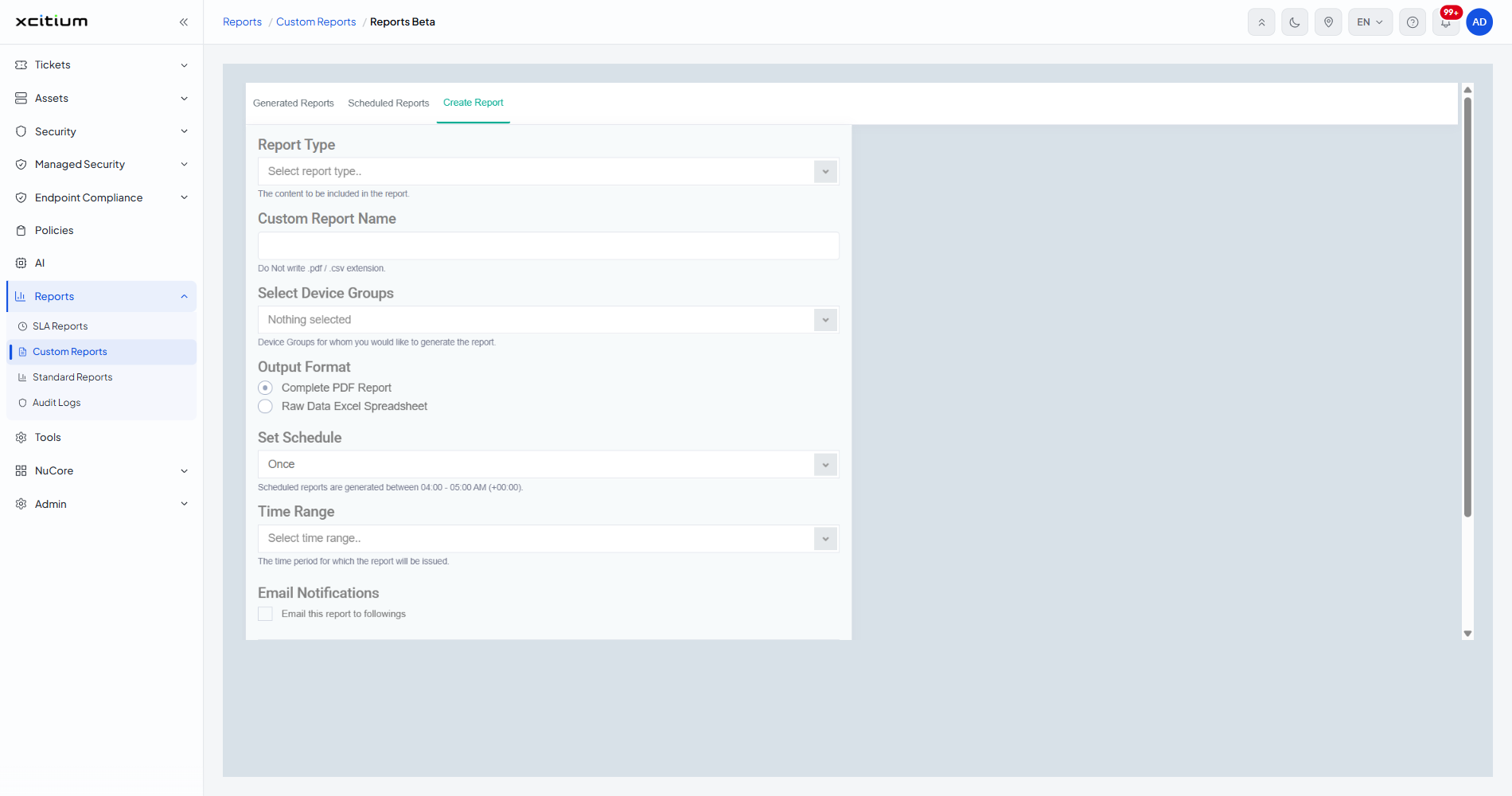
Field Descriptions
| Field | Control | Options / default | Helper text on screen |
| Report Type | Drop-down, placeholder 'Select report type..' | 'Anti-Virus Scan History Report', 'Executive Summary Report', 'Hardware Inventory Report', 'Hardware Inventory Report - Real Time', 'Issue Report', 'Patch Compliance Report', 'Risk Assets Report', 'Risk Threat Activity Report', 'Risk Threat Intelligence Report'. Nothing is chosen for you. | 'The content to be included in the report.' |
| Custom Report Name | Text box | Empty. | 'Do Not write .pdf / .csv extension.' |
| Select Device Groups | Multi-select drop-down, showing 'Nothing selected' | One entry per device group on the account. Tick as many as the report should cover. | 'Device Groups for whom you would like to generate the report.' |
| Output Format | Two radio buttons | 'Complete PDF Report' (selected for you) or 'Raw Data Excel Spreadsheet'. | — |
| Set Schedule | Drop-down | 'Once' (the default), 'Daily', 'Weekly', 'Monthly'. | 'Scheduled reports are generated between 04:00 - 05:00 AM (+00:00).' |
| Time Range | Drop-down, placeholder 'Select time range..' | 'Yesterday', 'Last Week', 'Last 7 Days', 'Last 30 Days', 'This Month', 'Last Month', 'All Time', 'Custom'. Nothing is chosen for you. | 'The time period for which the report will be issued.' |
| Email Notifications | Tick box, 'Email this report to followings' | Cleared. Tick it to add the addresses the finished report should be sent to. | — |
Report Types Compared With the Other Tabs
The beta console's report types are its own. None of them appears in the 'Report Type' list on Standard Reports, and none matches a tile in The Report Catalogue except 'Hardware Inventory Report'. Choose the console by the report you need, not by habit.
Build a Report
- Click 'Reports' > 'Custom Reports' and open the 'Generated Reports' sub-tab.
- Click 'Reports Beta', then the 'Create Report' tab.
- Choose the report from 'Report Type'.
- Type a name into 'Custom Report Name'. Leave the extension off — the console adds it.
- Open 'Select Device Groups' and tick each group the report should cover.
- Choose 'Complete PDF Report' for a finished document, or 'Raw Data Excel Spreadsheet' to work with the figures yourself.
- Leave 'Set Schedule' on 'Once' for a one-off, or choose 'Daily', 'Weekly' or 'Monthly' to add a row to the 'Scheduled Reports' tab.
- Choose the period from 'Time Range'.
- Tick 'Email this report to followings' and add the recipients if the report should be mailed out.
- Click 'Create Report'. The report appears on the 'Generated Reports' tab.
Form Buttons
| Button | Description |
| Create Report | Submits the form and queues the report. |
| Cancel | Clears the form without producing anything. |
| Apply | Confirms the ticks in the 'Select Device Groups' list. |
Note: a report built here is listed only in the beta console. It does not appear on the 'Standard' tab's 'Generated Reports' sub-tab.